MCP security is the practice of protecting AI agents and the enterprise systems they connect to when those connections happen through the Model Context Protocol (MCP), the open standard that lets AI agents reach external tools, databases, and services through a consistent interface. Those connections bypass traditional security practices because the AI model decides at runtime which tool to invoke and with what data, creating attack surfaces that conventional perimeter controls and threat intelligence weren’t designed to cover. MCP security best practices apply controls at the points where the protocol creates new pathways: authentication for every connection, authorization for every tool call, validation of the data flowing in either direction, and observability across the whole chain.
Key risks facing MCP servers include:
Prompt injection: Malicious prompts can trick an AI agent into performing unintended or harmful actions.
Credential theft: MCP servers can store API keys and tokens, making them a target for attackers.
Server compromise: Attackers can deploy malicious or intentionally vulnerable MCP servers to poison data or execute harmful code.
Supply chain attacks: Downloading unverified MCP servers from unofficial sources can introduce malware and give attackers a platform from which to exploit other services.
Why MCP Security Matters Now
Adoption is outpacing security maturity. Roughly half of organizations are actively experimenting with MCP servers, but only 11% have reached production according to industry surveys. The 39-point gap is where most exposure lives: pre-production deployments haven’t been through formal security review, authorization wrappers are added opportunistically rather than by design, and the attack vectors that matter most don’t wait for a production launch to become relevant. They’re available the moment a server initializes a connection. Independent scans have documented thousands of internet-exposed MCP servers, hundreds leaking API keys, and a significant percentage of public MCP packages with known security issues.
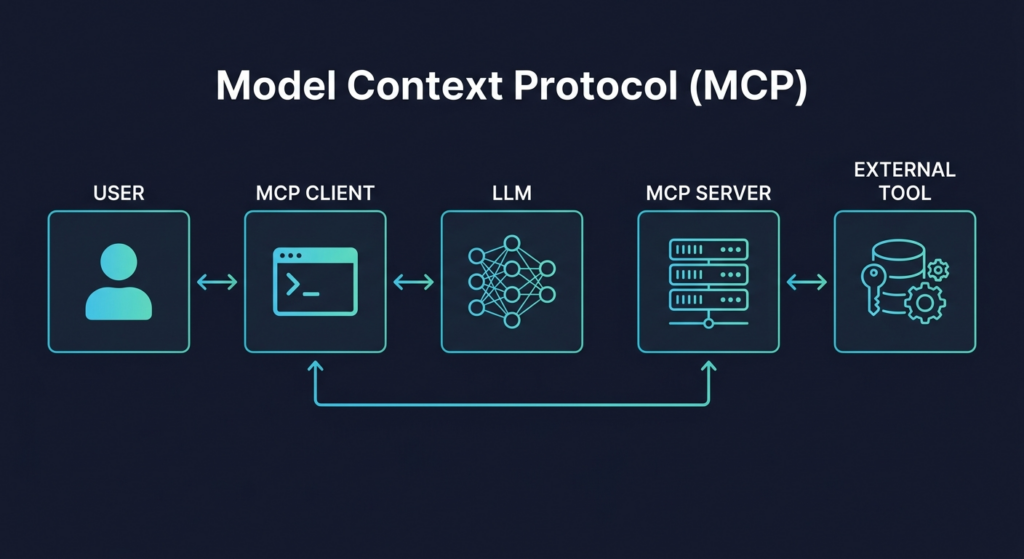
MCP separates the AI model from the external tools it uses. It does this through a two-part architecture: the MCP client and the MCP server. The client interfaces with the large language model, while the server handles communication with external tools or services. This setup prevents the AI from directly interacting with tools, adding a layer of control and abstraction.
A typical request follows this flow:
A user sends a request to the MCP client (Claude Desktop, Cursor, Claude Code, etc).
The client references its list of available MCP servers and the tools each one supports.
It sends this information, along with the user’s request, to the LLM.
The model responds with the name of the tool to use and the parameters required.
The MCP client forwards this to the correct MCP server.
The server executes the task and returns the result.
The client sends the result back to the model, which generates a response for the user.
MCP clients can connect to multiple MCP servers at once. These servers might run locally, where the host is under the user’s control, or remotely, hosted by a third party. Local servers typically run OS commands or custom code, and they carry a different set of security considerations than remote servers. While remote servers don’t run on the user’s infrastructure, they still pose a risk if they access sensitive data or respond with malicious output.
One of the core security concerns with MCP is the confused deputy problem, where an MCP server unintentionally performs actions on behalf of a user, using broader privileges than the user should have. Since MCP servers act as intermediaries between AI models and external tools, it’s critical they execute actions only with the user’s explicit permission and limited scope.Proper client registration also matters here: whether you use dynamic client registration or static client ids, adding redirect checks through URI validation and network checks like IP validation helps reduce spoofing and stale client entries. For public clients that cannot safely store secrets, OAuth 2.1 should protect the flow with a proof key, a secure code exchange, and careful redirect handling.
The current MCP authorization framework relies on OAuth, and the MCP authorization specification in the broader MCP specification makes a key architectural choice: the authorization server is separated from the MCP server, which acts as the resource server.
In practice, the MCP spec expects identity providers to handle authentication and token issuance while MCP servers validate tokens and enforce access policies. Enterprise deployments should also integrate with existing identity infrastructure through SSO before any actions are taken on a user’s behalf. Servers should also reject inbound requests that carry tokens that were not explicitly issued for them. To reduce confused deputy risk, deployments need per-client security controls and clear consent management, including a visible consent screen and time-bound approval, so users can review tool access and data read/write scope before an MCP client proceeds.
2. Supply Chain Risks
MCP servers are essentially software modules that users download and run, often from public repositories. This makes them prime targets for supply chain attacks, where malicious actors compromise the server code before or after installation.
Attackers can tamper with the source code, inject backdoors, or modify dependencies to introduce vulnerabilities. Even seemingly minor misconfigurations in build pipelines can expose users to significant risk. Unsigned MCP components or ones without verified integrity checks are especially dangerous.
3. Unauthorized Command Execution
A local MCP server often runs on a user’s machine with direct access to the host, and many are designed to execute operating system commands or run scripts based on model instructions. When implemented carelessly, these servers can be vulnerable to command injection, where malicious input is interpreted as executable code.
For example, if user input is directly passed to subprocess.call or a shell command without validation, an attacker can craft input that executes arbitrary commands. A compromised local MCP server with file system or network access can gain access to sensitive resources and expand the attack surface. This kind of vulnerability is especially dangerous on local servers with elevated permissions.
Local command execution should require explicit user consent before any command runs.
4. Prompt Injection
Prompt injection remains one of the most difficult vulnerabilities to fully prevent in AI systems, and in MCP it is a major MCP security risk that exposes broader security risks across real-world MCP implementations. In the context of MCP, injected prompts can trigger the server to perform real-world actions like calling APIs, modifying data, or running commands.
Attackers can design prompts that exploit the model’s behavior, such as obfuscated text that hides secondary instructions. Defenses should strictly validate all inbound requests and treat prompt injection as part of the broader category of injection attacks. A user might innocently paste such a prompt into the MCP client, thinking it performs a benign action, when in fact it also includes hidden logic that performs dangerous actions, like leaking data or provisioning unauthorized accounts.
5. Tool Injection
Malicious or compromised MCP servers can exploit the tool selection mechanism used by AI models. Because models implicitly trust tool descriptions, misleading metadata is dangerous: an attacker could create a tool injection scenario where a tool with a deceptive name or description is selected for one purpose while actually performing another.
For example, a tool claiming to retrieve weather data might secretly collect system logs or send sensitive information to a remote endpoint. The tool might pass initial inspection but later be updated to behave maliciously, exploiting the user’s trust in the original version. Tool poisoning can also manipulate tool outputs; a 2025 analysis of open-source MCP servers found that 5.5% showed this issue, potentially leading to over-privileged access. Malicious MCP servers can introduce false results or redirected actions, either directly or through compromised MCP channels.
6. Sampling Misuse
MCP supports sampling, a feature that allows servers to request language model completions via the MCP client. While this helps decentralize cost and centralize control, it also creates an avenue for abuse if a malicious server sends prompt data to the model that results in harmful behavior or data leakage.
A compromised server could use sampling to indirectly manipulate the AI model or to extract private user information via crafted prompts. This turns the user’s own LLM against them.
Try Obot today — the open-source MCP gateway. Self-hostable, MIT licensed, full audit trail at every tool call.
Best Practices for MCP Security: A Defense-in-Depth Framework
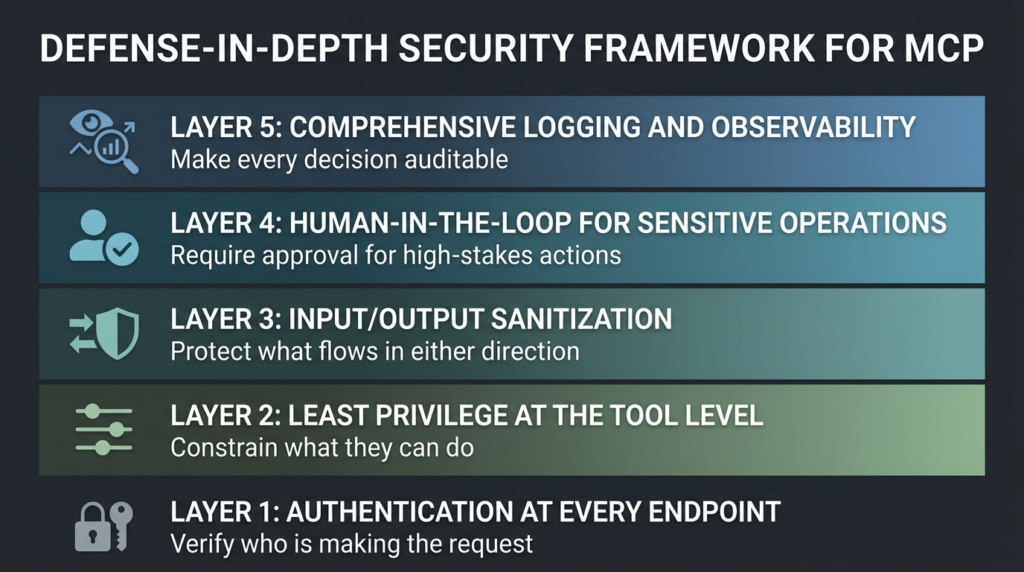
No single control closes the gap between what MCP permits by design and what an organization actually intends to allow. The vulnerabilities described above arise from different points in the architecture, and defending against them requires controls at corresponding layers. The practices below organize defense into five reinforcing layers. Authentication establishes who is making the request. Least privilege constrains what they can ask for. Sanitization protects what flows in either direction. Human-in-the-loop catches the actions that shouldn’t have been automated. Logging makes the entire system observable.
Layer 1: Authentication at Every Endpoint
Every remote MCP server should require OAuth 2.1 with PKCE, terminate at a recognized authorization server, and validate token audience and claims before honoring any request. HTTP endpoints without an authorization wrapper function as open proxies regardless of how they were intended to be used.
Require signed MCP server artifacts and verify at startup.
MCP clients should verify the authenticity and integrity of MCP server artifacts before execution. Require all servers to be signed using cryptographic signatures and validate these signatures at startup. Unsigned or tampered binaries introduce risk of arbitrary code execution. By enforcing signature checks, you reduce exposure to supply chain attacks targeting agent skills and MCP server packages, ensure only vetted code is executed, and can build trust policies around verified publishers or build pipelines. For servers installed from public sources, verification should be automatic and mandatory. Authentication around server distribution and onboarding should follow the current MCP specification’s OAuth 2.1 requirements and PKCE for public clients to prevent authorization code interception, especially in production environments.
Use and rotate short-lived credentials instead of passing through raw user tokens.
MCP servers must avoid token passthrough, where raw user access tokens are sent directly to downstream APIs. As outlined in guidance on MCP token security and brokering, poor token handling, weak token storage, and weak session management can enable session hijacking. Use short-lived, scoped tokens issued explicitly to the MCP server, and, where possible, store secrets in a vault or equivalent protected storage instead of environment variables.
Rotate credentials frequently to minimize exposure. Validate token audience and claims before use. Session IDs should be secure and non-predictable, and servers should bind session IDs to user-specific information to reduce unauthorized access.
Passing raw tokens undermines auditing and violates trust boundaries between components. The server should always act as the authoritative party when accessing external resources and not just forward credentials it cannot validate.
Layer 2: Least Privilege at the Tool Level
Server-level access controls (which user can connect to which server) are necessary but insufficient. The confused deputy problem emerges when a user with legitimate server access can invoke tools that exceed their intended permission scope. Tool-level access controls scope each user or role to a specific subset of tools, parameters, and operations, so an agent invoking a “delete contact” function fails authorization even when the calling user has general access to the underlying CRM server.
Enforce least-privilege scopes per tool and resource.
MCP servers should adopt a progressive scope model grounded in the Principle of Least Privilege (PoLP), which means only giving accounts permissions which are strictly necessary. Begin with minimal scopes (discovery or read-only access) and only request additional privileges when needed. Excessive permissions create risk zones for AI tools and agents, especially when they have broad file or network access. Following the Principle of Least Privilege reduces the impact of token compromise and helps prevent unauthorized actions and data breaches, and it must be paired with enterprise-wide access control for MCP servers so permissions stay consistent across environments.
Use targeted scope challenges when privileged actions are required, accept down-scoped tokens to support reduced access levels, avoid publishing wildcard or omnibus scopes in scopes_supported, and log all scope elevation events with correlation IDs for auditing. Solutions like Cloud Infrastructure Entitlement Management continuously evaluate and revoke excessive permissions across all clouds. Least-privilege design also makes token revocation easier and reduces user friction during consent flows.
Deny by default and use explicit per-tool allowlists and schemas.
MCP clients should deny tool invocations by default and require explicit allowlists for each permitted tool. Explicit allowlists are one of the core security controls for reducing the attack surface of tool calls. Allowlisting should include tool names and versions, parameter schemas with allowed types and constraints, and permitted scopes or actions, mirroring best practices for designing and implementing MCP tools. Allowlists should be backed by continuous monitoring to detect abnormal patterns in MCP server interactions, such as sudden bursts of file writes or unusual outbound connections, and to ensure compliance with security policies. This limits the risk of unauthorized or unexpected tool execution, especially from malicious or compromised servers. Security teams should centrally manage and regularly review allowlists.
Layer 3: Input/Output Sanitization
Two distinct data flows need monitoring. Outbound flows (tool responses returning to the model) need PII detection and redaction for MCP tool calls before sensitive fields reach the LLM context. Inbound flows (external data fetched by tools) need scanning for embedded instructions that could constitute indirect prompt injection. Both should happen at the control plane, where they can be enforced consistently across every tool invocation, rather than inside individual servers where coverage will be uneven.
Terminate all model/tool egress through policy-enforced proxies.
MCP systems should prevent direct model-to-tool or tool-to-internet communication unless it passes through a controlled proxy. This MCP proxy layer should enforce access policies, inspect traffic, and log outbound requests, including MCP traffic to external systems. Benefits include preventing exfiltration of sensitive data via tool responses or sampling prompts, enforcing tool-specific egress rules, and blocking outbound access to unauthorized or malicious endpoints. Network segmentation, including VPC boundaries and micro-segmentation across on-premise environments and different cloud providers, is critical to limit lateral movement and minimize breach impact if a tool or server is compromised. All MCP traffic should be protected with strong, enterprise-grade encryption in transit, and sensitive data should remain encrypted at rest across connected systems. This is especially important for remote servers or tools capable of calling external APIs.
Routinely fuzz and probe tools for attack surface, fixing injection sinks first.
Security testing of MCP tools should be ongoing. Use fuzzing and adversarial testing to uncover command injection vulnerabilities, prompt injection handling weaknesses, and misuse of sampling or system calls. An injection sink is a place where an MCP tool takes input from the model (or from another tool, in chained workflows) and passes it to a destination that might have escalated privilege, such as a shell or API call. Prioritize fixing these first, as they can be exploited to gain control over local systems or exfiltrate data. Tools accepting model input as parameters should be hardened and validated against malformed or malicious content.
Layer 4: Human-in-the-Loop for Sensitive Operations
Some operations should not be automated. Deleting records, modifying access controls, sending external communications, and committing financial transactions all warrant explicit user approval at the moment of execution, even when the agent has technical authorization to proceed. This is intentional friction. The cost of pausing for human approval is small; the cost of an agent executing an unintended privileged operation can be significant. Consent flows should be time-bound, visible to the user, and scoped to the specific operation being approved rather than to the broader tool or session. Local command execution in particular should require explicit user consent before any command runs.
Layer 5: Comprehensive Logging and Observability
Observability is the layer that makes the other four defensible. Authentication, least privilege, sanitization, and human-in-the-loop controls all generate decisions that need to be recorded, queried, and analyzed. Without that record, security teams can confirm a policy exists but can’t confirm it’s working. Establishing secure MCP server pipelines and catalogs ensures the components generating those logs are themselves trusted. The practices below cover what to capture and how to make it usable.
Log every tool invocation with hashed inputs and outputs.
All MCP tool executions should be logged, including the name of the tool, hashed input parameters, and hashed outputs. These logs support forensic analysis, audit trails, and detection of misuse or anomalies. An MCP server that cannot provide detailed audit logs of who connected, what actions they performed, and the reasons for their access is not production-ready, especially for enterprise environments.
Hashing inputs and outputs protects user privacy while still enabling replay detection, behavioral analysis, and tracking of abnormal tool usage patterns. Every significant event in the client lifecycle (consent granted, tokens issued, scope changes) should generate an auditable log entry to ensure transparency and compliance. Logs should include timestamps and correlation IDs to tie invocations to specific model requests.
Continuously inventory and disable shadow MCP servers.
Maintain an inventory of the entire MCP environment, not just the individual servers deployed in your own workspace. Identify and disable shadow servers, including those running without user consent, installed outside of approved channels, or exposing tools not listed in official configurations. Continuously discovering shadow servers improves your overall security posture and should extend to IDE extensions and other untrusted components in AI development workflows, and it depends on understanding where and how MCP servers are hosted and run across environments.
To do this, scan for running MCP processes and open ports, verify server origins and integrity, and audit recent installations and configuration changes. Cloud Security Posture Management tools and other unified management frameworks can aggregate security telemetry, misconfigurations, and alerts into a single dashboard across environments. Pair that with centralized logging in a SIEM, Zero-Trust Architecture with continuous verification of all users and devices, and cross-cloud SSO/MFA to standardize defenses, underpinned by coherent MCP identity management strategies that prevent OAuth and credential sprawl.
Beyond inventory cleanup, incident response should include regular cross-cloud drills and provider-specific reporting requirements, ideally aligned to an enterprise MCP architecture reference that defines how identity, access, audit, and data controls fit together.
How to Evaluate an MCP Security Solution
Organizations evaluating MCP security tooling fall into two groups: those building governance from scratch alongside their first production deployments, and those retrofitting controls onto MCP servers that grew faster than the review process. Both groups need the same evaluation criteria. The questions below distinguish products that can deliver the defense-in-depth framework from products that solve part of the problem and leave the rest as an exercise.
Identity integration. Does the solution integrate with your existing identity provider (Okta, Entra, Google Workspace, Auth0) through SSO, or does it require parallel user management? Identity that doesn’t sync with the rest of the enterprise creates offboarding gaps and audit reconciliation problems.
Tool-level access controls. Can access be scoped below the server level to individual tools, parameters, and operations? Server-level controls alone leave the confused deputy problem unsolved.
Token brokering. Are OAuth tokens held centrally at the control plane, or do MCP clients receive raw tokens they can use outside the control plane’s audit boundary? If clients hold raw credentials, those credentials can be exercised against underlying APIs without any of the access controls or logging the solution provides.
Audit log completeness and accessibility. Does the solution log every tool invocation with user identity, timestamp, server, tool name, and parameters? Can logs be filtered, exported, and routed to a SIEM? An audit trail that exists but can’t be queried doesn’t satisfy compliance requirements.
Egress policy enforcement. Does the solution sit on the egress path for tool-to-external-system traffic, or do tools communicate directly with downstream services? Egress that bypasses the control plane creates a path that controls and logging never see.
Server vetting and catalog management. Does the solution provide a curated catalog of approved MCP servers with version pinning and integrity verification, or does it expect each team to evaluate third-party servers independently? A catalog approach centralizes the review work; a per-team approach guarantees inconsistency.
Operational visibility. Can security teams see what MCP servers are running across the organization, including shadow deployments? Can usage patterns be analyzed for anomalies? Operations that can’t be observed can’t be defended.
Deployment model. Does the solution support both hosted and self-managed deployments? Sensitive industries (finance, healthcare, defense) often need self-managed for compliance reasons; other organizations prefer hosted for operational simplicity. A solution that only supports one model limits flexibility.
A solution that answers all eight questions can deliver the defense-in-depth framework as an integrated capability rather than as a list of practices the security team has to assemble. A solution that answers only some of them defines the work that remains.
Frequently Asked Questions
Is MCP inherently insecure?
No. MCP is a protocol specification. Security depends on how it’s deployed. The same protocol can be secure with appropriate authentication, access controls, and monitoring, or insecure when those controls are missing. The risks documented in this article aren’t intrinsic to MCP; they’re characteristic of MCP deployments that haven’t implemented the defense layers.
Do we need an MCP gateway, or can we secure individual MCP servers?
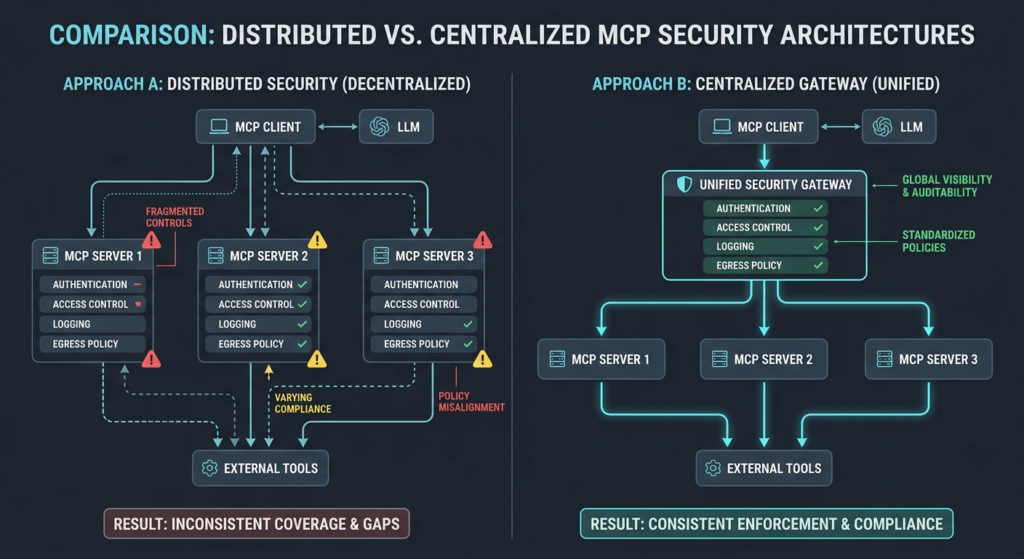
In theory, both approaches can work. In practice, securing individual servers distributes the security work across every developer building every server, guarantees inconsistency, and creates fragmented coverage. A centralized gateway implements the controls once at the trust boundary that already exists in the MCP architecture, where the client decides which server to invoke. For deployments with more than a few servers, centralization typically reduces cost and improves coverage.
How does MCP security differ from API security?
Traditional API security focuses on authenticating callers, authorizing requests, and validating inputs at known endpoints. MCP security adds an additional concern: the model interprets context (tool descriptions, parameters, external data) at runtime and decides what to invoke. That interpretation layer creates new attack surfaces (prompt injection, tool poisoning, indirect injection) that conventional API security testing isn’t designed to catch, and these MCP security risks for 2026-era deployments require a broader, defense-in-depth strategy.
What’s the difference between OAuth 2.1 and OAuth 2.0 for MCP?
OAuth 2.1 consolidates security best practices that emerged after OAuth 2.0 was published. The MCP authorization specification requires OAuth 2.1, which mandates PKCE for all clients (not just public clients), removes the implicit grant flow, and tightens redirect URI handling. Deployments using OAuth 2.0 patterns need to migrate to OAuth 2.1 to align with the MCP spec.
Can we use MCP with our existing identity provider?
Yes, and you should. The MCP authorization specification separates the authorization server from the MCP server, which means existing identity providers (Okta, Entra, Google Workspace) can handle authentication and token issuance while MCP servers validate tokens and enforce policy. Solutions that don’t integrate with the IdP and require parallel user management create operational and audit problems that compound over time.
How do we detect a compromised MCP server?
Centralized logging captures the symptoms: unexpected tool invocations, anomalous data patterns in tool responses, authentication failures, scope elevation attempts. Tool integrity verification (signature validation at startup, version pinning) catches some compromises before they execute. Behavioral monitoring of tool invocation patterns catches others after they’ve started but before they’ve done significant damage. Detection requires both: integrity controls to catch pre-runtime compromise, observability to catch runtime anomalies.
What’s the minimum viable security posture for an MCP production deployment?
At a minimum: every remote endpoint requires OAuth 2.1 authentication; every tool invocation is logged with user identity; OAuth tokens are stored centrally rather than in client configurations; access is scoped through enterprise identity provider groups rather than per-user configuration; sensitive operations require explicit approval. These five controls don’t constitute a complete defense, but they close the gaps that historically produce the most severe MCP incidents.
How a Centralized MCP Gateway Implements These Practices
The defense-in-depth framework and evaluation criteria above describe what an MCP security posture needs to include. The harder operational question is where those controls live. The default implementation path, the one most engineering teams take under deadline pressure, is to build security into each MCP server. That approach distributes the work across every developer, guarantees inconsistency, and creates the fragmented coverage that defenders rarely see and attackers reliably find.
A centralized MCP gateway implements the controls once, at the trust boundary that already exists in the MCP architecture. The client decides which server to invoke based on tool descriptions provided by the gateway; the gateway brokers authentication and authorization; the gateway logs every invocation; the gateway enforces egress policy. Individual server developers don’t reimplement OAuth 2.1, don’t manage their own audit logging, don’t apply their own access controls. Those concerns become infrastructure rather than per-server feature work. This positioning matters because the trust crisis emerging around autonomous agents is fundamentally an infrastructure problem; controls applied at the agent or model layer can’t enforce what controls applied at the gateway can.
This positioning also changes the security review process. Approved tools are already authenticated, already logged, already access-controlled. The friction of waiting for security review on each new deployment disappears because the review happened once at the catalog level. Engineering velocity and security posture stop being in tension; centralization serves both.
Obot MCP Gateway is built specifically for this role. It implements the five layers of the defense-in-depth framework as integrated capability rather than as a checklist for individual server developers to satisfy, applying MCP gateway architecture to the security problem rather than reinventing it. Identity integration, tool-level access controls, token brokering, comprehensive audit logging, and egress policy enforcement are all centralized at the gateway. Open-source for self-managed deployments, hosted for organizations that want the gateway delivered as a service, and supported by hands-on resources like an MCP tutorial for building servers and clients.