Best MCP Authentication Tools: Top 5 Enterprise Options in 2026
Published:
Last Updated:
What Are MCP Authentication Tools?
MCP authentication tools are systems that manage how identities are verified and authorized across MCP servers. Since MCP does not define a built-in authentication standard, these tools provide a consistent way to handle identity, credentials, and access control.
They replace the need for each server to implement its own authentication method. Instead of relying on a mix of API keys, OAuth flows, or custom logic, authentication tools introduce a unified layer that handles login, token issuance, and permission enforcement.
They also adapt authentication for agents. Traditional methods like OAuth are designed for human interaction, but MCP authentication tools provide non-interactive flows that agents can use securely. This allows both users and agents to access multiple MCP servers without managing separate credentials for each one.
Why Enterprises Need Specialized MCP Authentication Tools
Risks of Weak or Missing Authentication
With MCP, authentication is required to establish trust before tools are executed, so when it is inconsistent or poorly implemented, security risks increase quickly. Each MCP server may handle credentials differently, which leads to gaps in how access is controlled. As the number of servers grows, so does the likelihood of mistakes. Teams may hardcode tokens, forget to rotate credentials, or apply inconsistent access rules. These issues create opportunities for unauthorized access and data leaks. Traditional API security does not fully address MCP-specific threats. Effective MCP security must also account for prompt injection and tool poisoning. Manipulated tool descriptions can introduce additional security risk by misleading agents about what a tool does or should access.
The lack of centralized control also makes governance difficult. Without a unified system, enforcing policies like role-based access or usage limits becomes fragmented. Each server operates independently, making it harder to ensure compliance across the organization.
Identity Fragmentation Challenges in MCP Ecosystems
In MCP environments, each server effectively acts as its own identity provider. It must issue and validate tokens independently, which leads to duplication of identity logic across the system. This creates identity fragmentation across the broader MCP ecosystem. Users and agents need separate credentials for each server, and there is no shared identity layer. As a result, authentication becomes inconsistent and harder to manage.
Agents face additional challenges because they cannot complete interactive login flows. Without a unified system, centralized security policies cannot ensure consistent enforcement across MCP environments, so developers often need to build custom solutions to handle credentials on behalf of agents, increasing system complexity and introducing more points of failure for security teams.
Need for Centralized Identity and Access Control Across MCP Servers
Enterprises need a single enterprise authentication layer that works across all MCP servers. Without it, operational overhead grows with every new server added, and successful MCP adoption usually depends on centralizing identity and access control rather than adding one-off authentication to each server. A centralized approach allows users and agents to authenticate once and reuse that identity everywhere. Permissions and access policies can then be defined in one place and applied consistently across all servers.
This model also simplifies credential management. Instead of handling multiple tokens, teams manage a unified system that supports secure, non-interactive authentication flows. Enterprise multi-channel authentication helps secure access across endpoints, applications, and APIs. It reduces duplication, improves security, and allows MCP ecosystems to scale without fragmentation, while ensuring end-to-end audit trails are essential for secure MCP deployments.
Try Obot today — the open-source MCP gateway. Self-hostable, MIT licensed, full audit trail at every tool call.
Key Features to Look for in MCP Authentication Tools for Enterprise
SSO Integration
SSO integration allows MCP authentication tools to connect with an enterprise’s existing identity provider (IdP) through enterprise IdP integration, such as Okta or Azure AD. Users authenticate once through the organization’s standard login flow, with support for SSO SCIM for provisioning and access workflows, and that identity is reused across MCP servers.
Instead of introducing new login systems, MCP tools should work with existing identity infrastructure while relying on the same SSO infrastructure that already enforces policies like MFA, device checks, and conditional access. This ensures consistency with enterprise security standards and avoids creating parallel identity systems.
Granular RBAC
Granular role-based access control (RBAC) defines what users or agents can do after authentication. Permissions are grouped into roles and assigned based on responsibilities, ensuring that access is limited to what is necessary.
In MCP environments, RBAC is critical because agents execute actions autonomously. Fine-grained roles allow organizations to control which tools, data, or operations each agent can access.
Token Lifecycle Management
Token lifecycle management ensures that authentication tokens are securely issued with short-lived lifespans, then rotated, refreshed, and revoked over time. Instead of treating authentication as a one-time setup, MCP systems must continuously manage token validity and expiration. OAuth 2.1 with PKCE and mTLS are emerging standards for MCP authentication.
This includes handling token expiry, enabling non-interactive refresh flows for agents, using token exchange to maintain security boundaries when MCP accesses data, logging lifecycle events, supporting rotation without downtime, and integrating with an authorization server where needed. Proper lifecycle management reduces the risk of compromised or stale credentials being used in production.
Audit Logs and Observability
Audit logs provide a complete, traceable record of authentication events, token usage, tool access, and the detailed actions taken by agents in MCP. Observability ensures that every action, whether initiated by a user or an agent, is recorded with identity context and timestamps.
This visibility is required for security monitoring, incident response, and compliance. Enterprise teams rely on this level of auditability for investigations and compliance, with a full audit trail to understand who accessed what, when, and under which permissions across MCP systems.
Policy Enforcement and Governance
Policy enforcement ensures that access rules, security constraints, organizational policies, and MCP governance are consistently applied across all MCP interactions. This includes enforcing access scopes, validating permissions before tool execution, and applying governance rules centrally.
A unified control layer or gateway can act like an API gateway for policy enforcement across all MCP traffic, preventing inconsistent implementations and ensuring compliance with enterprise standards. This ensures that security rules are applied uniformly, with MCP access governed consistently regardless of which MCP server or agent is involved.
Scalability Across Multiple MCP Servers
Scalability means the authentication system can support a growing number of MCP servers without increasing complexity or fragmentation. In practice, an MCP client or agent may trigger API calls to 10-20 tools simultaneously, which makes centralized scalability more important. Instead of each server handling its own authentication logic, a centralized layer manages identity, tokens, and access control across the ecosystem for production MCP deployments.
This approach enables consistent security and easier onboarding of new servers, while maintaining performance through load balancing and distributed infrastructure. It also ensures that adding new MCP servers does not require duplicating authentication logic or reconfiguring access controls.
Notable MCP Authentication Tools for Enterprise
1. Obot
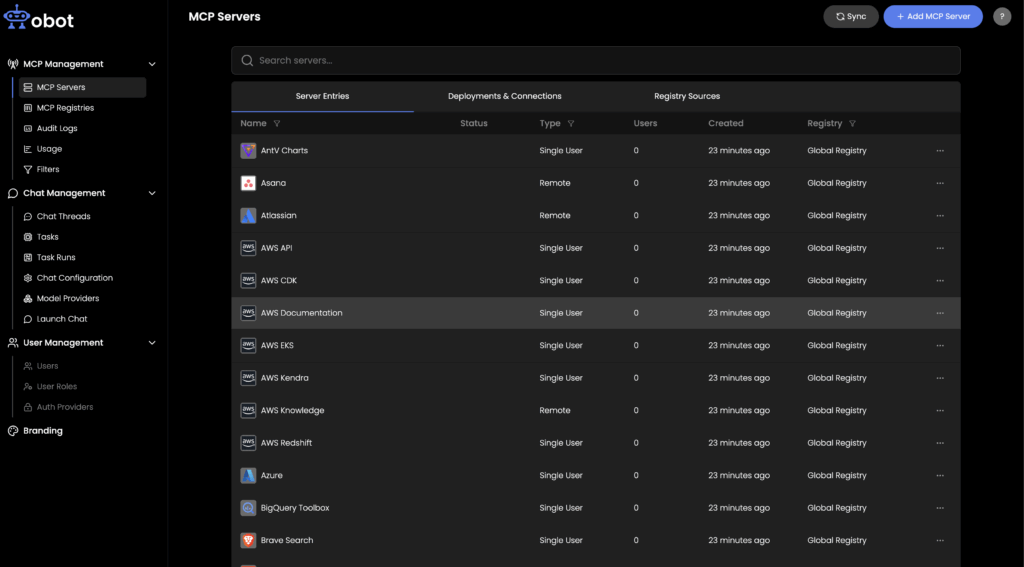
Obot is an open-source MCP gateway platform that centralizes authentication, authorization, and access management for MCP servers in enterprise environments where multiple servers, users, and agents require a unified authentication layer. It acts as a secure reverse proxy between clients and MCP servers, integrating with existing identity providers and enforcing access policies without requiring changes to individual server deployments. The platform covers the full MCP management lifecycle — from server hosting and catalog management to audit logging and role-based access control.
Obot is an open-source enterprise MCP platform that centralizes authentication, authorization, and access management for MCP servers in enterprise environments where multiple servers, users, and agents require a unified authentication layer. It acts as a secure reverse proxy between clients and MCP servers, helping teams govern local MCP servers and connect remote MCP servers through one control layer while integrating with existing identity providers and enforcing access policies without requiring changes to individual server deployments. The platform covers the full MCP management lifecycle — from managing MCP servers and server hosting to catalog management, audit logging, role-based access control, and support for production MCP servers.
General features include:
Open-source MCP platform: Provides a self-hostable, GitOps-compatible gateway deployable on existing Kubernetes infrastructure with full control over data and configuration, including workflows that support MCP server generation for hosted deployments.
MCP registry and catalog management: Allows IT administrators to define and publish an approved catalog of connected MCP servers, controlling which servers users can discover, review, and install across tools like VS Code and GitHub Copilot.
Role-based access control (RBAC): Supports granular role definitions — including admin, user, auditor, and owner roles — to govern who can publish, access, and manage MCP servers.
Comprehensive audit logging: Tracks all token activity, server interactions, and access events to support compliance monitoring and incident review.
Integration with AI clients and agent frameworks: Works with clients such as Claude Desktop, ChatGPT, and GitHub Copilot, and is compatible with agent frameworks including n8n and LangGraph.
MCP authentication features:
SSO and identity provider integration: Connects with major authentication providers such as Okta and Microsoft Entra to verify user identity before granting access to MCP servers, reusing existing enterprise SSO infrastructure without introducing parallel login systems.
OAuth 2.1 support: Implements standards-based authentication and authorization flows, including encryption in transit, to secure client-server communication.
API key authentication for programmatic access: Issues API keys for machine-to-machine and agent-driven workflows that require non-interactive authentication.
Centralized access policy enforcement: Applies fine-grained permissions at the gateway level, controlling which users or autonomous agents can connect to specific MCP servers or invoke individual tools.
Secure proxying with full request logging: Routes all MCP traffic through a controlled proxy with explicit MCP gateway capabilities for secure request handling, policy enforcement, and activity recording, preventing direct or ungoverned connections to backend servers.
Microsoft Entra ID is a cloud-based identity and access management platform that secures access to applications, data, and services across cloud and on-premises environments. It centralizes authentication, enforces security policies, and supports modern access patterns such as zero trust for enterprise authentication use cases. In MCP environments, it can act as a centralized identity provider, issuing tokens and applying conditional access policies for both users and agent-based systems, including enterprise deployments where multiple users and agents need consistent policy enforcement.
Key features include:
Single sign-on and app integration: Enables users to access multiple applications with one set of credentials across cloud and on-premises systems.
Multifactor and passwordless authentication: Strengthens identity verification using MFA and passwordless login methods.
Conditional access policies: Applies risk-based access controls based on user, device, and context.
Identity protection: Detects and mitigates identity-based threats using risk signals and analytics.
Privileged identity management: Enforces least-privilege access for sensitive resources.
MCP authentication features:
Centralized identity provider for MCP: Acts as a unified identity layer to authenticate users and services accessing MCP servers and enterprise systems.
Token-based access control: Issues secure tokens that MCP clients and agents can use to authenticate requests.
Agent identity support: Supports emerging agent identity capabilities for managing and securing AI agents.
Policy-driven access enforcement: Applies conditional access and Zero Trust principles to MCP interactions, which helps enterprise security teams centralize decisions.
Google Cloud MCP Servers provide a managed way to expose services and data to AI applications using model context protocol servers within the Model Context Protocol. They include built-in authentication and authorization mechanisms based on Google Cloud identity systems. These servers allow agents and users to securely connect to tools and resources while enforcing access controls through IAM policies.
Key features include:
Remote MCP server hosting: Runs MCP servers on cloud infrastructure with HTTP-based access for AI applications, with transport security for remote connections enforced via HTTPS.
MCP discovery and tool management: Allows agents to discover available tools, prompts, and resources dynamically.
Administrative controls: Provides centralized management of MCP usage through cloud controls.
Security protections: Includes mechanisms to scan and secure MCP interactions against risks.
MCP authentication features:
Identity-based authentication: Uses Google credentials or application identities to authenticate access to MCP servers.
IAM policy enforcement: Applies fine-grained permissions to control who can access MCP tools and resources.
Authorization specification compliance: Aligns with the MCP specification for consistent access control.
Agent and client identity validation: Ensures only verified agents, users, and MCP clients can interact with servers.
4. Auth for MCP
Auth for MCP, built on Auth0, can work with Auth0 or another oauth provider depending on architecture, providing a dedicated authentication and authorization layer for MCP servers. It integrates standard OAuth-based flows with MCP-specific requirements over the MCP protocol, enabling secure access for both users and AI agents. The system focuses on identity federation, token security, and scalable client registration to simplify authentication across distributed MCP environments.
Key features include:
Universal login support: Allows users to authenticate using social, enterprise, or custom identity providers.
Single sign-on and federation: Connects with external identity providers and existing identity infrastructure to centralize authentication.
Multifactor authentication and attack protection: Enhances security with MFA and protections against common threats.
Token management and lifecycle control: Secures credentials using token vaults and manages token exchange flows.
Audit logging and compliance: Tracks authentication events for monitoring and regulatory needs.
MCP authentication features:
OAuth 2.1-based MCP flows: Implements authorization code flow with PKCE in alignment with the mcp spec for secure MCP authentication.
Dynamic client registration: Allows MCP clients to register programmatically without manual setup.
Metadata discovery endpoints: Enables MCP clients to automatically discover endpoints in an authorization server model for MCP-compatible flows.
Scoped, identity-bound tokens: Issues tokens with least-privilege access tailored to MCP interactions.
Agent-safe authentication: Prevents exposure of sensitive credentials while enabling agents to act on behalf of users.
5. Okta MCP Server
The Okta MCP Server connects AI agents to Okta’s identity and access management APIs, enabling automated identity operations through MCP. As one MCP server, it can be a starting point before enterprise deployments expand to multiple servers, and it can also complement custom MCP servers used for internal APIs. It provides a bridge between natural language-driven agents and enterprise IAM workflows, while maintaining secure authentication and authorization controls. The server supports both interactive and non-interactive authentication flows, making it suitable for user-driven and automated agent scenarios.
Key features include:
Integration with Okta APIs: Enables management of users, groups, and policies through MCP tools as part of a broader deployment of individual MCP servers.
User and group management: Supports creating, updating, and managing identities and access groups.
System log access: Allows retrieval of audit and system activity data.
Extensible automation workflows: Enables complex identity operations through agent-driven interactions.
MCP authentication features:
Flexible authentication methods: Supports both device authorization (interactive) and private key JWT (headless) flows.
Browserless agent authentication: Enables secure, non-interactive login for automated agents and services.
Scoped token issuance: Grants permissions based on defined API scopes following least-privilege principles.
Secure credential handling: Uses environment variables and key-based authentication to protect secrets.
OAuth 2.0 and OIDC support: Aligns with standard protocols for secure token-based authentication and explicit MCP support in enterprise environments.
MCP authentication tools provide a consistent way to manage identity, access, and security across distributed MCP environments. By centralizing authentication flows, enforcing policies, and supporting agent-friendly token mechanisms, they reduce fragmentation and improve control. This allows enterprises to scale MCP deployments securely while maintaining visibility, compliance, and operational simplicity.