
Best MCP Gateway Solutions for Enterprise: Top 5 in 2026
What Are MCP Gateway Solutions?
MCP gateway solutions are infrastructure layers that sit between AI systems and enterprise data sources, managing how they connect and interact. Instead of allowing each AI agent to directly integrate with databases, APIs, or internal tools, the gateway acts as a centralized intermediary that routes all requests through a single control point. Top MCP gateway solutions include Obot, MintMCP, and TrueFoundry.
This gateway handles key responsibilities such as authentication, authorization, service discovery, and request routing. AI agents connect to the gateway once, and the gateway determines how to fulfill each request by interacting with the appropriate back-end systems. This removes the need for custom integrations between every model and every tool.
MCP gateways function similarly to API gateways, but are designed specifically for AI workloads and the MCP standard. They provide a unified interface that supports multiple AI models and multiple enterprise systems, allowing organizations to scale AI integrations without creating a complex web of direct connections.
In this article:
Why Enterprises Need MCP Gateway Solutions
Security and Governance
An MCP Gateway enforces security by acting as a single checkpoint for all interactions between AI systems and enterprise resources. Every request from an AI agent is validated at the gateway, which ensures proper authentication and applies access control rules before allowing any operation.
This setup enables role-based permissions, so each AI agent can only access the data and tools it is authorized to use. It also centralizes credential management. Instead of embedding API keys or secrets in each agent, the gateway stores them securely and injects them only when needed. This reduces the risk of leaks and prevents AI systems fromever directly handling sensitive credentials.
The gateway also supports governance by enforcing global policies such as rate limits, IP restrictions, and data filtering. It can detect and block suspicious behavior, including misuse of tools or malicious prompt patterns. Because all activity flows through one layer, organizations can apply consistent security controls and meet compliance requirements more easily.
Scalability for AI Systems
AI workloads can generate unpredictable traffic, especially when a single request triggers many downstream tool calls. An MCP Gateway helps manage this by distributing and optimizing how requests are handled across systems.
It can balance load across multiple service instances, cache frequent responses, and queue requests during spikes. This prevents back-end systems from being overwhelmed and ensures consistent performance even under heavy usage. The gateway also improves reliability by handling retries and failover when services are unavailable.
Because the gateway centralizes these concerns, organizations can scale AI usage without redesigning integrations. Adding new tools or increasing demand does not require changes in each AI agent. Instead, capacity can be expanded at the gateway level, making the system easier to grow and maintain.
Observability and Control
With all AI-to-system interactions passing through a single layer, the MCP Gateway provides full visibility into how AI is being used. It logs every request, including which agent made it, what tool was accessed, and the outcome.
This centralized telemetry allows teams to monitor performance, identify bottlenecks, and debug issues more effectively. It also supports auditing and compliance by maintaining a detailed history of actions. Organizations can quickly answer questions about data access or system usage without searching across multiple disconnected logs.
The gateway also enables real-time monitoring and alerting. Unusual patterns, such as excessive access to sensitive systems, can be detected and flagged. This level of control turns AI integrations from opaque processes into observable and manageable systems.
Faster AI Deployment
MCP Gateways reduce the time required to connect AI systems with enterprise tools by eliminating the need for custom integrations. Instead of building separate connectors for each model and service, teams integrate once with the gateway and reuse that connection across all use cases.
This significantly lowers development effort and speeds up deployment. New tools can be added by registering them with the gateway, making them instantly available to authorized AI agents without additional coding. Similarly, updates to credentials or policies can be applied in one place rather than across multiple systems.
By standardizing connectivity and centralizing configuration, the gateway allows teams to move from experimentation to production more quickly. It shifts effort away from integration work and toward building useful AI-driven applications.
Key Features of Enterprise MCP Gateway Solutions
Centralized Authentication and Identity Mediation
An enterprise MCP Gateway handles authentication for all AI interactions in one place. Instead of each AI agent managing its own credentials, the gateway verifies identity and mediates access to downstream systems.
This allows integration with existing identity systems such as SSO or token-based authentication. The gateway ensures that every request is tied to a verified identity and applies the correct permissions before forwarding it.
By centralizing this process, organizations avoid duplicated auth logic across agents and reduce the risk of inconsistent or weak security implementations. It also simplifies credential rotation and access updates, since changes are made once at the gateway and apply everywhere.
Tool Discovery and Routing
The gateway maintains a catalog of available tools, services, and data sources that AI agents can access. Instead of hardcoding integrations, agents query the gateway to discover what capabilities are available.
When a request is made, the gateway determines which back-end system should handle it and routes the request accordingly. This includes selecting the correct service endpoint and managing communication with it.
This dynamic discovery and routing model removes tight coupling between AI agents and tools. It allows new services to be added or updated without requiring changes in the agents themselves, improving flexibility and maintainability.
Context/State Management Across Workflows
AI-driven workflows often involve multiple steps and interactions with different systems. The MCP Gateway helps maintain context across these steps so that each request does not operate in isolation.
It can track session data, intermediate results, and workflow state as requests move between tools. This ensures continuity, allowing complex operations to be executed reliably without losing important information between steps.
By managing state centrally, the gateway reduces the burden on individual AI agents to coordinate multi-step processes. This leads to more consistent execution and simplifies the design of complex workflows.
Rate Limiting and Usage Controls
The MCP Gateway enforces limits on how frequently AI agents can call tools or access resources. This prevents overloading back-end systems and protects against excessive or abusive usage.
Rate limits can be applied globally or per agent, tool, or user role. The gateway can also monitor usage patterns and enforce quotas, helping organizations control costs and allocate resources effectively.
Because these controls are centralized, policies can be updated without modifying individual integrations. This ensures consistent enforcement and makes it easier to adapt to changing demand or operational constraints.
Human-in-the-Loop Approval Workflows
For sensitive or high-impact actions, the MCP Gateway can introduce human approval steps before execution. When an AI agent attempts such an operation, the request is paused and routed to a human reviewer.
The reviewer can inspect the request details and decide whether to approve or reject it. This adds an extra layer of oversight for actions like financial transactions, data modifications, or access to critical systems.
These workflows allow organizations to safely deploy AI automation while retaining control over critical decisions. They also build trust in AI systems by ensuring that important actions are not executed without validation.
Notable MCP Gateway Solutions for Enterprises
1. Obot

Obot is an enterprise MCP gateway platform that provides a unified layer for managing how AI agents discover, access, and interact with tools, APIs, and data sources. It acts as both a gateway and orchestration layer, enabling organizations to centralize tool connectivity while maintaining control over access, execution, and workflows.
Unlike traditional gateways that focus primarily on routing requests, Obot emphasizes agent-to-tool orchestration and dynamic tool discovery. It allows AI systems to connect to a broad set of MCP-compatible services through a single interface, while enforcing security policies and maintaining visibility into usage across environments.
Key features include:
- Unified connector-based tool access: Provides a catalog of prebuilt connectors (e.g., GitHub, Gmail, databases) that can be centrally managed and exposed to AI agents, simplifying integration with enterprise systems.
- Dynamic tool discovery and invocation: Allows AI agents to discover available tools at runtime instead of relying on hardcoded integrations, improving flexibility and reducing maintenance overhead.
- Centralized access control and governance: Applies authentication, authorization, and usage policies at the gateway level, ensuring that agents only interact with approved tools and data sources.
- Session and workflow coordination: Maintains context across multi-step interactions and coordinates how requests are routed and executed across different MCP servers and services.
- Observability and usage tracking: Captures activity across agents and tools, providing visibility into system behavior, debugging insights, and auditability for enterprise environments.
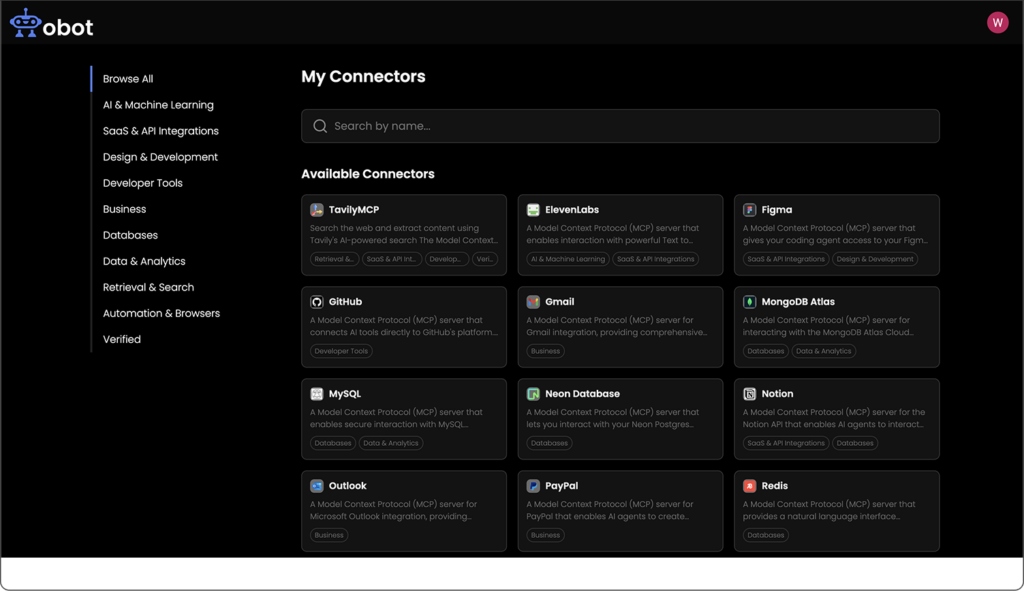
Source: Obot
2. MintMCP Gateway
MintMCP Gateway is an enterprise MCP gateway platform that standardizes and secures how AI agents interact with internal and external systems through managed MCP servers. It acts as a control layer where data sources are connected once, and all access is governed through centralized policies.
Key features include:
- Centralized MCP server management: Manage all MCP servers from a single control plane. This includes configuring connections, enforcing policies, and monitoring usage across every integration without handling each server separately.
- Support for STDIO-based MCP servers: Deploy MCP servers that typically run locally (STDIO-based) into a managed environment. The gateway handles hosting, execution, and lifecycle management so teams do not need to maintain local processes.
- MCP registry with one-click setup: Access a centralized catalog of MCP servers. Teams can install and configure servers quickly without manual setup, reducing time spent on integration work.
- Virtual MCP servers with role-based access: Create logical groupings of MCP servers for teams or use cases. Apply role-based permissions so only authorized users or agents can access tools or data sources.
- Automatic discovery and connection: The platform detects available MCP servers and simplifies connection setup. This removes the need for manual configuration and reduces integration errors.
3. TrueFoundry MCP Gateway
TrueFoundry MCP Gateway is an enterprise MCP gateway that provides a unified and secure layer for accessing MCP servers and orchestrating AI-driven workflows. It connects enterprise tools through prebuilt or custom MCP servers, then manages authentication, discovery, and execution through a centralized system.
Key features include:
- Unified access to MCP servers: Provides a single gateway through which AI agents can access all enterprise tools and services. This removes the need for direct integrations and standardizes how systems are accessed.
- Instant tool and service discovery: Automatically discovers all registered MCP servers and exposes them based on access permissions. Agents can find and use available tools without hardcoded configurations.
- Centralized MCP server registry: Maintains an inventory of all MCP servers across cloud, on-prem, and hybrid environments. Teams can manage, view, and control all integrations from one interface.
- Role-based access control (RBAC): Applies fine-grained permissions at the MCP server level. Access is restricted based on user roles, ensuring only authorized agents or users can interact with tools.
- Federated authentication and identity integration: Integrates with identity providers such as Okta and Azure AD. Supports OAuth 2.0 and federated login to securely authenticate users and agents across systems.
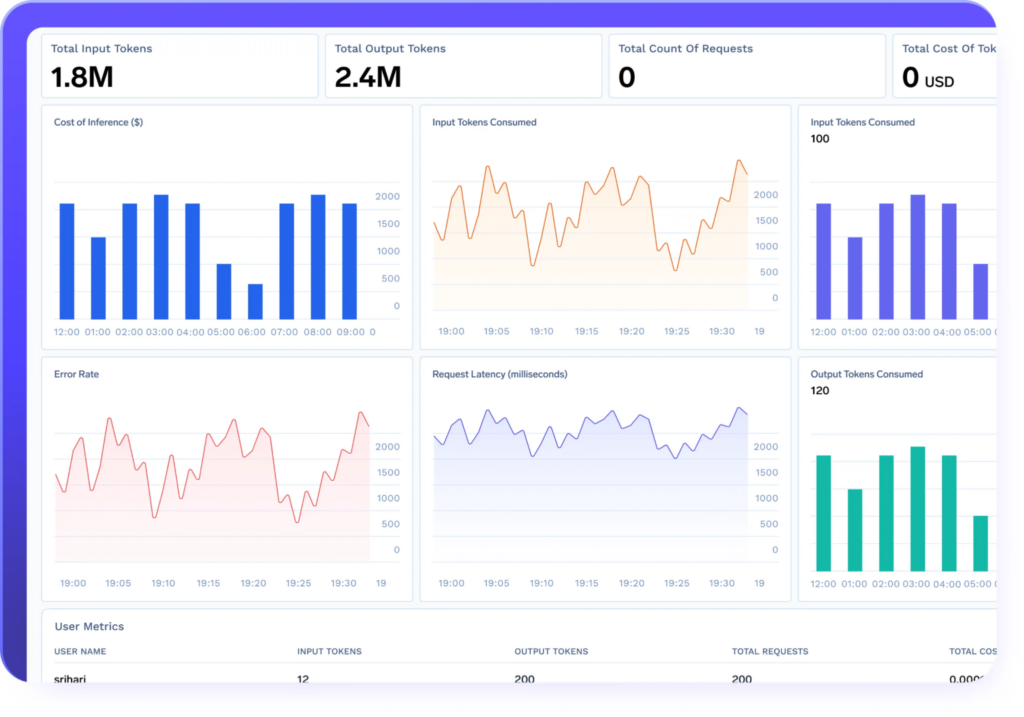
Source: TrueFoundry MCP Agents
4. Usercentrics MCP Manager
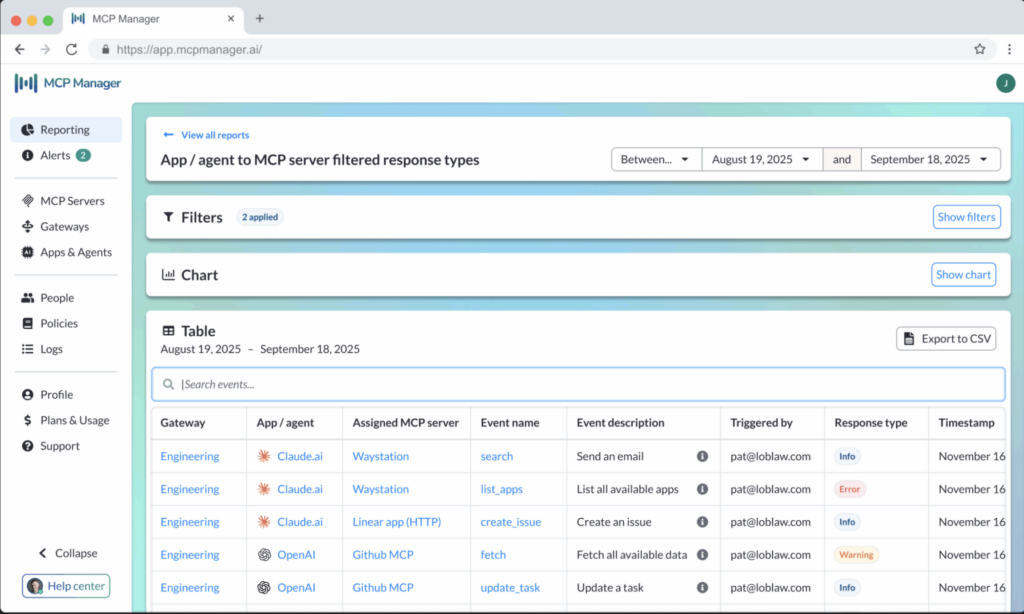
MCP Manager by Usercentrics is an MCP gateway that gives teams centralized control over how AI systems access business data and tools, while maintaining security and governance. It simplifies the deployment of MCP servers by allowing teams to provision them quickly without manual setup, and adds built-in guardrails to reduce risk in production environments.
Key features include:
- Centralized visibility and control: Provides a single control layer to oversee how AI interacts with enterprise systems and data. Teams can monitor access patterns and maintain control over the entire MCP ecosystem from one place.
- Rapid MCP server deployment: Enables teams to provision and deploy MCP servers in seconds without writing code. This reduces setup time and allows faster transition from development to production.
- Built-in observability and logging: Captures logs of all MCP-related activity. Every request is traceable, enabling teams to understand system behavior and investigate issues.
- Reporting and alerts: Generates real-time insights into MCP usage and system activity. Custom alerts help teams respond quickly to anomalies or potential security incidents.
- Comprehensive audit trails: Maintains full records of interactions and system changes. This supports compliance requirements and simplifies auditing processes.
Source: Usercentrics MCP Manager
5. IBM ContextForge
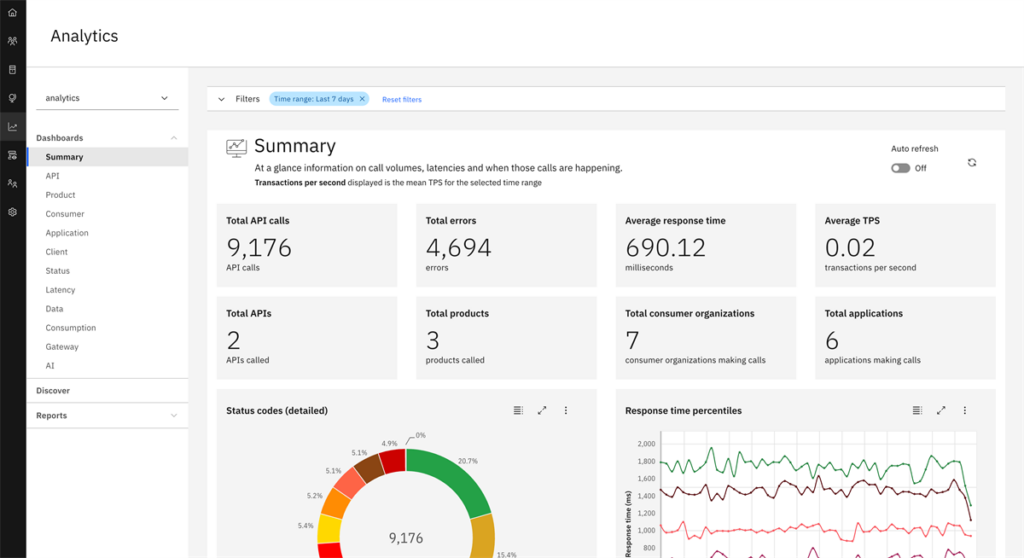
IBM ContextForge is an open-source MCP gateway that acts as a unified registry and proxy for tools, agents, and APIs, exposing them through a single endpoint for AI clients. It federates MCP servers, REST/gRPC services, and agent-to-agent systems, while adding centralized governance, discovery, and observability. The platform also translates and virtualizes different protocols into MCP-compatible interfaces.
Key features include:
- Unified registry and proxy layer: Combines MCP servers, APIs, and agent systems into a single endpoint. This simplifies how AI clients interact with multiple back-end services.
- Federation across services and environments: Supports federation of multiple MCP servers and REST services across distributed systems. Enables unified access even in multi-cluster or hybrid deployments.
- Tools gateway with protocol translation: Converts MCP, REST, and gRPC services into a common interface. Includes gRPC-to-MCP translation using automatic service discovery and reflection.
- Agent gateway with multi-provider support: Supports agent-to-agent (A2A) communication and routing across providers like OpenAI, Anthropic, and custom agents. Allows flexible orchestration of agent workflows.
- API gateway capabilities: Includes built-in rate limiting, authentication, retries, and reverse proxy support for REST services. This ensures reliable and secure API interactions.
Source: IBM ContextForge
6. Docker MCP Gateway
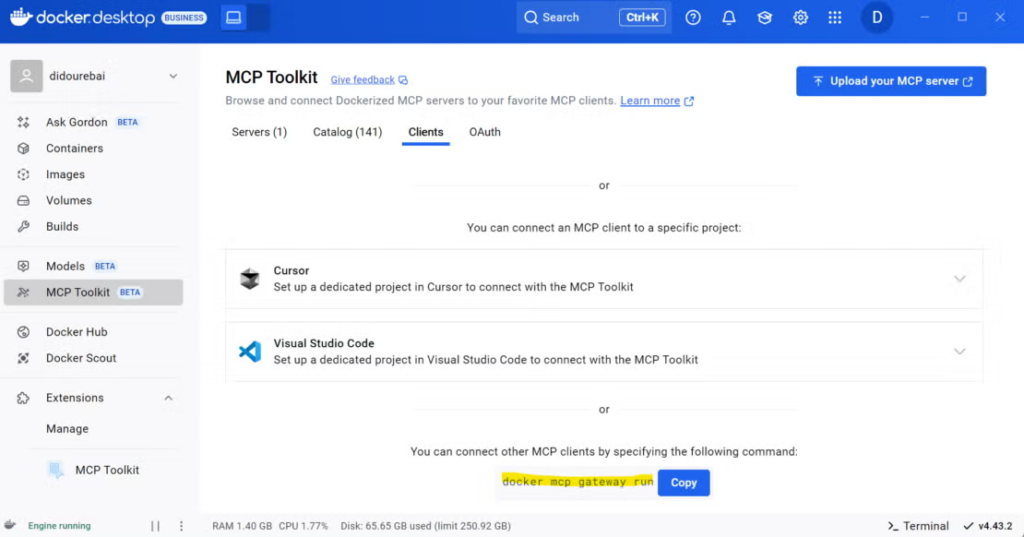
Docker MCP Gateway is a developer-focused MCP gateway built into Docker’s MCP Toolkit that provides a unified and secure way to run, manage, and access MCP servers using containerized infrastructure. It abstracts the complexity of MCP server lifecycle management by running each server in isolated Docker containers and exposing them through a single gateway interface.
Key features include:
- Container-based MCP server execution: Runs each MCP server inside an isolated Docker container. This ensures proper isolation, minimal host access, and safer execution of tools.
- Unified gateway interface for AI clients: Exposes all MCP servers through a single gateway endpoint. Multiple clients (e.g., VS Code, Claude Desktop) connect to the same configuration for consistent behavior.
- MCP server lifecycle management: Provides commands to list, inspect, and interact with MCP servers, tools, and resources. Simplifies operational management across multiple servers.
- Profile-based server organization: Groups MCP servers into profiles that can be shared, exported, and connected to clients. Profiles help organize environments and manage configurations at scale.
Source: MCP Gateway
Conclusion
MCP gateway solutions provide a structured way to connect AI systems with enterprise tools while maintaining security, scalability, and control. By centralizing authentication, routing, and observability, they remove the complexity of direct integrations and allow organizations to manage AI interactions as a unified system. This makes it easier to scale AI adoption, enforce consistent policies, and operate reliably in production environments.