LLM application development involves creating software applications that leverage large language models (LLMs) like OpenAI GPT or Meta LLaMA to understand, generate, or manipulate natural language. This process includes integrating LLMs into applications to perform tasks such as text summarization, question answering, and content generation.
Developers in this field work on designing the architecture of such applications, focusing on achieving high performance and scalability, while ensuring LLMs provide good responses to user requests. The development process requires a deep understanding of both the technical aspects of large language models and the practical considerations of application design.
This includes selecting appropriate LLMs for specific tasks, engineering prompts and customizing models for better performance in particular use cases, and ensuring the application runs consistently in a production environment.
Building LLM applications from scratch can be complex. Platforms like Obot help you design, deploy, and manage AI workflows faster – without handling every layer manually.
Key Steps in LLM Application Development
Here’s an overview of the process of developing a production-ready large language model application.
1. Choose Between a Proprietary or Open-Source Foundation Model
When deciding on the foundation for an LLM application, developers face a choice between proprietary and open-source models. This decision influences the application’s capabilities, cost structure, and development flexibility.
Proprietary models, such as those offered by OpenAI, Anthropic, or Cohere, provide high performance and ease of use but require API access fees and offer limited customization options due to their closed nature. This can pose challenges for small-scale developers or projects with tight budgets.
Open-source models like Meta’s LLaMA or Mistral offer an alternative with greater flexibility and control over the model’s internals. These models allow more extensive customization and fine-tuning but may require more resources for maintenance and scaling. While free to use, the computational costs of deploying these models at scale should be carefully evaluated.
2. Create Targeted Evaluation Sets to Compare LLM Performance
To accurately assess the performance of different LLMs for a specific use case, it’s important to create evaluation sets. This involves analyzing general benchmarks to identify LLMs that potentially meet your requirements. These benchmarks offer insights into the models’ general capabilities and limitations, helping narrow down the options.
After shortlisting candidates, a custom evaluation set should be tailored to the particular application. This set should include scenarios and examples reflective of the real-world tasks the LLM will perform.
3. Customize the Foundation Model
The foundation model must be optimized for the application’s specific requirements. This involves adjusting the model to improve its understanding and output in areas such as domain-specific knowledge, task specificity, and desired tone of voice.
Prompt engineering techniques, especially in models with a large context window, can go a long way in providing relevant responses to users. However, in some cases more advanced techniques will be needed:
Fine-tuning with a labeled dataset relevant to your domain can significantly enhance performance. However, this might require substantial computational resources and expertise.
Retrieval Augmented Generation (RAG) can augment the model’s capabilities without extensive retraining. This involves integrating the model with a database of domain-specific information, allowing it to pull relevant details as needed. This strategy is generally more complex to implement than fine-tuning, and is computationally intensive at the inference stage.
4. Establish a Suitable Machine Learning Infrastructure
Selecting the right machine learning (ML) infrastructure is crucial when dealing with open-source models or customizing foundation models. A well-designed infrastructure must accommodate the computational intensity of LLMs. This involves choosing hardware capable of supporting the model’s processing needs, such as high-powered GPUs or TPUs.
The infrastructure should support data management and networking capabilities to handle data ingestion and model training. Efficient data pipelines help in maintaining a steady flow of information for training and inference stages. Cloud platforms offer specialized services to simplify these aspects with scalable computing resources, tools, and managed environments.
5. Optimize Performance with LLM Orchestration Tools
Orchestration tools streamline the preparation of prompts—a critical step before processing queries through the model. For example, in customer service applications, a query undergoes multiple levels of processing, including template creation, few-shot example integration, and external information retrieval. Each step refines the query’s context and expected outputs.
Orchestration tools like LangChain and LlamaIndex offer frameworks that automate these preparatory steps. By managing the sequence and execution of prompts, they reduce complexity and enhance the model’s responsiveness to diverse queries.
6. Secure the LLM Application
Implementing stringent input validation measures is essential to prevent prompt injection attacks, where attackers manipulate the model’s output by injecting harmful prompts. This involves treating the LLM as an untrusted entity and limiting its access to data and functionalities strictly necessary for its operation.
Additionally, authentication mechanisms ensure that only authorized users can interact with the application, further reducing the potential for malicious exploitation. Beyond protecting against external threats, it’s important to address vulnerabilities that may arise from within the application itself, securing the infrastructure against unauthorized access.
7. Implement a Continuous Performance Evaluation System for the LLM Application
A continuous evaluation system helps ensure that the application remains effective and aligned with user needs over time. This is especially important due to the rapid development of LLMs—evaluation is critical when an LLM application is upgraded to use a new version of a model.
Performance evaluation involves setting up mechanisms to regularly assess the application’s performance using a mix of automated tools and human feedback. By incorporating real-time data and user insights into the evaluation process, developers can identify areas for improvement and make iterative adjustments to optimize functionality.
Instead of managing each component individually, platforms like Obot allow you to orchestrate LLM workflows in a more streamlined way.
Tutorial: Building an LLM Application with LangChain
LangChain is an open-source Python framework designed to support the development of applications powered by LLMs. It provides developers with a suite of tools, components, and interfaces, simplifying the creation of LLM-centric applications.
With LangChain, developers can easily manage interactions with various language models, integrate APIs and databases, and link different components to build LLM applications.
Set Up LangChain in Python
To use LangChain in your Python environment:
Start by installing it through pip or conda. For pip installation, execute the command pip install langchain. If you prefer conda, use install langchain -c conda-forge.
To fully utilize LangChain’s capabilities with various integrations like model providers and data stores, additional dependencies are necessary. Install these by running pip install langchain[all].
After installation, set up your development environment to work with model providers or other services by configuring appropriate API keys. For OpenAI models, for example, you can set an environment variable ANTHROPIC_API_KEY="my-api-key" or directly pass the API key when creating an instance of the OpenAI class in LangChain:
from langchain.llms import Anthropic llm = Anthropic(anthropic_api_key="your-api-key-here")
Build an Application in LangChain
LangChain simplifies creating language model applications by abstracting the complexity of interacting with various LLM providers. To illustrate, consider developing an application that generates text based on user input:
Install the langchain-anthropic python package using the command pip install langchain-anthropic
Initialize the LangChain environment with your API key and choosing a model provider, such as OpenAI’s GPT, Anthropic Claude, or open Hugging Face models. For example, using Anthropic Claude:
API_KEY = "your-api-key"


from langchain_anthropic import ChatAnthropic
from langchain_core.messages import AIMessage, HumanMessage

model = ChatAnthropic(model="claude-3-opus-20240229", temperature=0, max_tokens=1024, api_key=API_KEY)

message = HumanMessage(content="Tell me a story about a princess")
This code snippet sets up LangChain to use Anthropic’s Claude 3 Opus model, specifying the API key for authentication.
Next, prompt the LLM to generate text based on a specific query. For example, to ask for a bedtime story: response = model.invoke([message]) print(response)
This sends the prompt to the chosen LLM through LangChain and prints the generated response.
Manage Prompt Templates for LLMs
LangChain provides a structured way to handle the management of prompt templates through its PromptTemplate class. This feature allows developers to create dynamic prompts that can be reused across different contexts by substituting variables.
For example, consider a scenario where you want to generate travel recommendations for various cities:
from langchain_anthropic import ChatAnthropic from langchain_core.prompts import ChatPromptTemplate API_KEY = "YOUR_API_KEY" chat = ChatAnthropic(temperature=0, model_name="claude-3-opus-20240229", api_key=API_KEY) system = ( "You are a helpful assistant that answers human questions." ) human = "{text}" prompt = ChatPromptTemplate.from_messages([("system", system), ("human", human)]) chain = prompt | chat
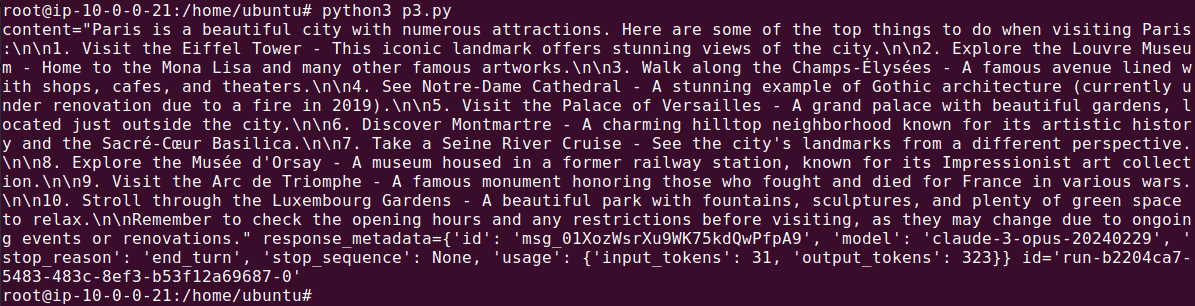
In this code snippet, {city} acts as a placeholder within the prompt template. When generating recommendations, the placeholder is replaced with an actual city name:
response = chain.invoke( { "text": "I'm visiting Paris, France. What are the top things to do", } ) print(response)
Build a Multi-Step Workflow
In multi-step workflows, combining LLMs and prompts involves creating sequences of operations where the output of one step serves as the input for the next.
For example, consider a workflow where the user provides a use case, and the system works in two steps:
Identifies the most appropriate programming language for a use case
Generates tips for that language
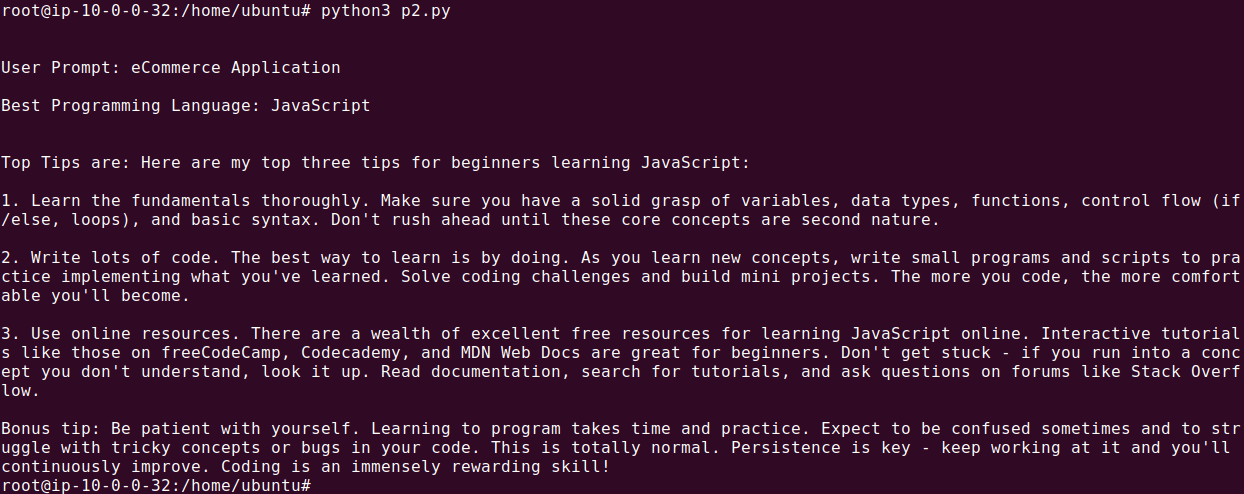
This process can be implemented using LangChain’s LLMChain and SimpleSequentialChain classes. Define two prompt templates, and then chain them together as follows:
from langchain_anthropic import ChatAnthropic from langchain.prompts import PromptTemplate from langchain.chains import LLMChain from langchain.schema.runnable.base import Runnable, RunnableSequence API_KEY = "<YOUR_API_TOKEN>" # Initialize the language model llm = ChatAnthropic(temperature=0, model_name="claude-3-opus-20240229", api_key=API_KEY) # Define the first prompt template first_prompt_template = PromptTemplate(template="What is the best popular programming language to use for {use_case}?Respond with only language name.", input_variables=["use_case"]) # Define the second prompt template second_prompt_template = PromptTemplate(template="What are the top three tips for beginners learning {language}?", input_variables=["language"]) # Create the runnable sequences first_runnable = first_prompt_template | llm second_runnable = second_prompt_template | llm # Define a function to extract the language from the first response def extract_language(response): # Assuming the response is a string with the language mentioned in it # You might need to adjust this based on the exact format of the response print(f"nBest Programming Language: {response.content}") return response # Custom RunnableSequence class to handle the intermediate step class CustomRunnableSequence(RunnableSequence): def invoke(self, inputs): first_response = self.first.invoke(inputs) language = extract_language(first_response) second_inputs = {"language": language} second_response = self.last.invoke(second_inputs) return second_response # Create the workflow chain using the custom sequence workflow_chain = CustomRunnableSequence(first=first_runnable, last=second_runnable) # Define the use case use_case = "eCommerce Application" print(f"nBest Programming Language: {response.content}") # Execute the workflow final_result = workflow_chain.invoke({"use_case": use_case}) # Print the final result print(f"nnTop Tips are: {final_result.content}")
The output should look something like this:
Challenges of Building LLM Applications
While LLMs enable powerful applications, building and maintaining them in practice can be complex.
Some of the most common challenges include:
Managing multiple components (models, prompts, data sources, and APIs)
Handling prompt consistency and versioning
Integrating LLMs with existing tools and systems
Orchestrating multi-step workflows
Monitoring performance and improving outputs over time
What starts as a simple prototype can quickly evolve into a system that requires significant engineering effort to scale and maintain.
As a result, many teams look for ways to simplify how LLM applications are built and managed.
From LLM Components to End-to-End Applications
Building a successful LLM application involves more than connecting to a model – it requires coordinating multiple steps into a complete workflow.
In practice, this often includes:
Capturing and processing inputs
Applying structured prompts
Generating and refining outputs
Triggering actions across systems (e.g., sending messages, updating databases)
Integrating with tools like CRMs, knowledge bases, or communication platforms
Managing these steps manually can quickly become difficult as applications grow in complexity.
Platforms like Obot help simplify this process by enabling teams to connect LLMs with their existing tools and turn individual components into fully functional, end-to-end workflows without needing to build everything from scratch.
Streamline How You Build LLM Applications
Developing LLM-powered applications can quickly become complex – but it doesn’t have to be.
Obot helps you:
Design and deploy AI workflows faster
Connect LLMs with your existing tools
Scale applications without managing every layer manually
👉 Try Obot to start building and scaling LLM applications more efficiently