Today I am excited to announce beta availability of Obot MCP Gateway, an open source platform that provides a comprehensive approach to managing, securing and delivering MCP servers safely to the enterprise.
The rapid rise of the MCP standard has created a strong desire in many organizations to adopt it for production use. The upside is obvious: by connecting LLMs to enterprise systems and data, AI can not only reason based on its built-in knowledge, AI can also fetch real-time information as needed and perform actions on its own. Enterprises will achieve an unprecedented level of automation and productivity gains powered by autonomous AI agents.
There are, however, a number of technical challenges to the safe adoption of MCP technology in the enterprise. There are thousands of MCP servers available on the internet, many of which connect to enterprise software, yet are rife with quality or security problems. It would be unwise and irresponsible to introduce arbitrary MCP servers in an enterprise environment. MCP servers being invoked autonomously by AI models only makes the risk higher.
The Obot MCP Gateway is a solution to this problem. It offers a rich set of capabilities for IT admins and business users to use MCP servers safely.
- Out of the box, the Obot MCP Gateway ships with a curated catalog of MCP servers. We have tested and validated to ensure these MCP servers receive up-to-date support from reputable vendors and introduce minimal risk to enterprise organizations. We continuously maintain and update the catalog with each new release of the Obot MCP Gateway software.
- Once an IT admin installs the Obot MCP Gateway and configures enterprise-level authentication (e.g., Active Directory or Okta), the admin can register additional MCP servers for the organization. The Obot MCP Gateway supports both local and remote MCP servers, as well as MCP servers that are designed to serve a single user or multiple users.
- The IT admin defines access control rules that determine which users or groups of users in the enterprise can access which MCP servers.
- The IT admin defines filter rules and guardrails to defend against user errors or malicious MCP servers.
- All MCP server calls are logged for auditing purposes. The IT admin has visibility from high-level usage stats all the way down to the tokens transmitted in every call.
- Business users in the enterprise are presented with a catalog of approved MCP servers. They can connect to the MCP servers from the MCP client of their choice.
- We ship an Obot Chat Client that enables convenient interaction with MCP servers directly from the catalog, without the need to configure a 3rd-party MCP client.
The Obot MCP Gateway is enterprise-grade software designed to run on Kubernetes clusters. We run MCP server instances in containers to ensure isolation across users. We utilize native auto-scaling capabilities of Kubernetes to handle variable load.
The following figure illustrates the architecture of the Obot MCP Gateway:
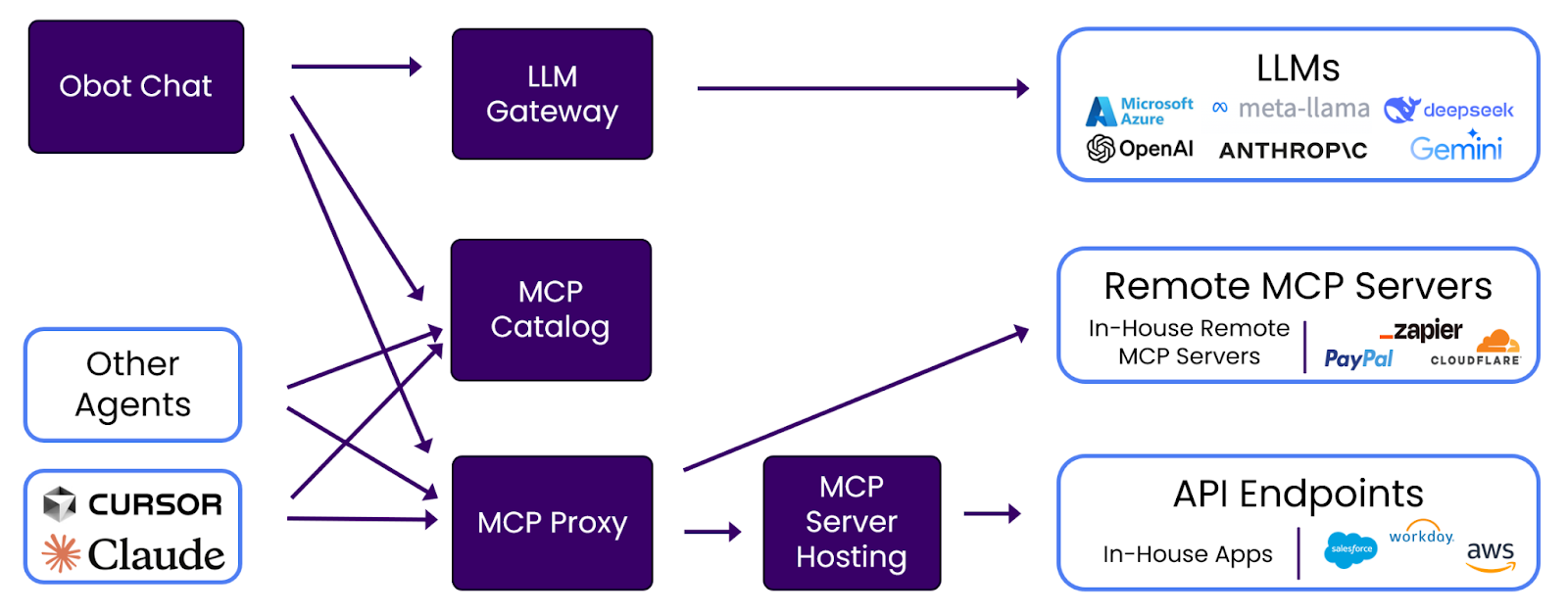
- MCP Catalog. A curated set of MCP servers created by Obot.ai and further enriched by the enterprise IT.
- MCP Proxy. Filters and logs all MCP calls.
- MCP Server Hosting. Hosts local MCP servers and exposes them to users as remote MCP servers.
- Obot Chat. A ChatGPT-like MCP client that works with multiple LLM providers configured by the enterprise IT admin.
- LLM Gateway. Enables the enterprise IT admin to configure the LLM providers that the Obot Chat client can use.
Today marks the initial Alpha release of the Obot MCP Gateway. You can download the software at https://github.com/obot-platform/obot. We welcome your questions and feedback.