Hello Obot readers – Anantha Kasetty here, and I’m excited to kick off a series of blog posts on the Model Context Protocol (MCP) and building secure AI infrastructure using Obot MCP Gateway. As an early employee at Kong, I’ve spent years watching APIs evolve from simple connections to being the critical backbone of enterprise data. I see the same challenges with the massive adoption of Large Language Models (LLMs), how do we connect them securely and scalably to all our internal and external systems?
You might be rightfully asking, do we need a new product to address the MCP control plane if there are already mature API gateways solutions available? Great question, to answer this, we need to look into the main premise of MCP systems. MCP is a new standard for connecting LLMs to data sources internal or external and designed specifically for LLM-tool interaction, which is fundamentally different from traditional API traffic. MCP allows you to extend the LLM functionality to internal and external systems without building custom integrations for each of the LLMs that you might be using.
But as MCP adoption scales in enterprise environments, familiar challenges emerge: governance, policy enforcement, secure access, and auditing. These are the problems Obot was built to solve.
This tutorial is part of The Obot MCP Gateway Enterprise Deployment & Security Series: From Architecture to Secure Production. Check out the other parts below:
Let’s begin with Part 1: Building a Secure MCP Platform with Obot
This series is for platform engineers, IT architects, and DevOps teams looking to implement a governed, enterprise-grade AI platform. Over the coming posts, you’ll get a detailed, practical guide to building secure MCP infrastructure. The seminal paper on MCP can be found here that provides details around the MCP.
To address these issues the Obot platform was created.
Obot is an open-source control plane for MCP that helps teams:
Host and manage MCP servers
Secure access and enforce policies
Bridge clients, identity providers, and backend systems
Provide observability and governance across your MCP infrastructure
In this blog, we look into Obot’s architecture and core components, how requests flow through the platform, and how identity and control are handled at each layer.
Try Obot Today
⬇️ Download the Obot open-source gateway on GitHub and begin integrating your systems with a secure, extensible MCP foundation.
Obot Architecture
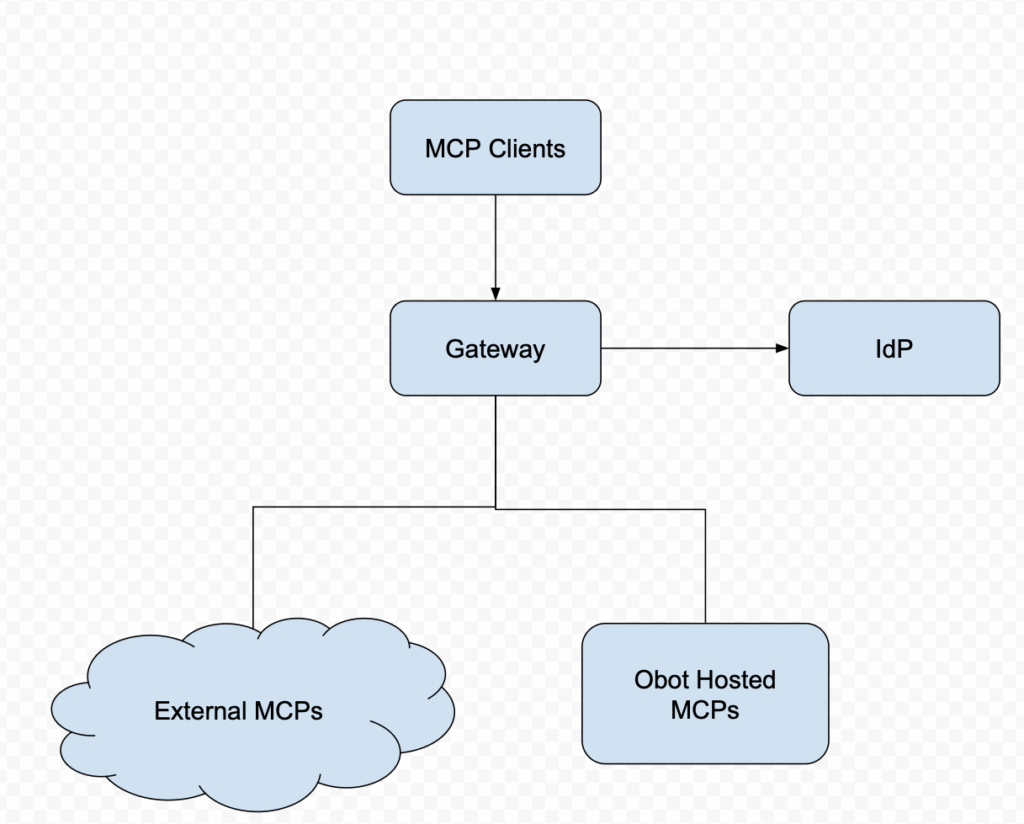
Let’s take a look at the Obot’s Logical Architecture and its core functional components.
The Gateway (The Data Plane)
The Obot MCP Gateway is the main component of the platform that handles all runtime traffic and data flow between the client and the MCP servers, with emphasis on security and request routing. It is the Data Plane as it handles all live runtime data (request/response). It is the entry point for all MCP Servers hosted on the platform. It sits between the client and the MCP servers. It proxies requests, enforces authentication, and manages active sessions.
The runtime engine of Obot MCP Gateway provides the following functionality
Proxying client requests to appropriate MCP servers
Hosting the MCP Servers either on Docker containers or Kubernetes.
Connect to remote 3rd Party or internally developed MCP Servers
Enforcing policy and access control as specified by the administrators
Session and token management to interact with the various MCP servers
Audit logging and traceability functionality that addresses governance and security.
Allow Custom validation, logging, security checks, or other business logic via Filters (Webhooks)
The Admin Interface (Control Plane)
While clients interact with Obot MCP Gateway, the Admin Interface / Control Plane is the centralized dashboard where IT/Platform Teams operate on a regular basis. The Control Plane is where all configuration for the Obot is set. The key capabilities of the Control Plane includes.
Onboarding new MCP servers via the Obot Registry.
Creating new registries and assigning visibility to these registries to various users.
Configure GitOps-driven workflows for tool deployment.
Monitor usage, system health and audit logs.
Manage fine-grained access control (RBAC).
The control plane can be operated interactively via a modern Web UI interface. The control plane functionality is also available via the CLI interface or GitOps workflows for declarative configuration.
In practice, most real-world deployments often adopt GitOps workflows to keep all server definitions and policies in version control. This enables one to track configuration drift, audit changes, and also provide CI/CD integrations.
The Chat Interface (Client Layer)
Users today are very familiar with the chat interface to interact with various LLMs. Adopting the same model, Obot provides a familiar chat interface, where users can interact with the various MCP servers that have been deployed. Obot also provides an ability to configure and create custom prompts to be used in the chat interface.
While the chat interface is a familiar and frequently used method of interacting with the LLMs that connect to various MCP servers, it is not the only way to interface. Obot provides programmatic access that is crucial for building and integrating with external components, like coding assistants, and AI agents.
In Obot Chat LayerUsers can create projects that define the behavior through customized instructions, optional knowledge files (for retrieval-augmented generation), and connections to external tools via MCP servers.
Within each project, users can open multiple threads which are separate conversations that share the same configuration but keep histories. This allows easy ways to explore different tasks or contexts without reconfiguration.
Beyond ad-hoc chat, Obot Chat supports deeper workflows through tasks (automated or scheduled runs using the same project resources), managed memory (important facts retained across conversations), and secure MCP server connections routed through the Obot gateway for policy, access control, and logging. Administrators control which model providers and tools are available, while users focus on composing projects, adding integrations or knowledge, and interacting with assistants in a consistent, governed environment.
Try Obot Today
⬇️ Download the Obot open-source gateway on GitHub and begin integrating your systems with a secure, extensible MCP foundation.
Under the Hood:
The Control Plane Architecture
Obot provides a control plane that includes:.
Catalog & Registry: Obot maintains a registry of available MCP servers (supporting OCI, Node, and Python runtimes). This allows for a “storefront” experience where admins can curate a specific set of tools for different departments.
The Proxy & Policy Engine: When an LLM calls a tool, it doesn’t talk to the server directly. It sends a request to the Obot Gateway. The Gateway checks the Policy Engine to verify if the specific user has the rights to call that specific tool on that specific server.
Hosting & Container Lifecycle: Obot can manage the lifecycle of the MCP servers themselves. If you are running on Kubernetes or Docker, Obot handles the spinning up of ephemeral containers or persistent processes required to fulfill a tool request.
Identity and Enterprise Authentication
Obot handles identity by integrating directly with your existing Identity Providers (IdP). The IDP integration can be with GitHub or Google (Social IDPs). When using the Obot Enterprise version, external IDPs can also include Okta and Microsoft Entra.
The authentication of users using these IDPs can be further controlled to a specific set of email domains.
Leveraging the integration with your IdP, you can map MCP access to existing employee groups that are in your IDP. Take for example, your “DevOps Admin” group in IDP can be granted access to the “Kubernetes MCP Server,” while a different IDP group, “Marketing”, can be restricted to access only the “Google Drive MCP Server.”
Observability and Auditing
In regulated environments and during development, one needs to be able to answer questions like: “Who used this tool?”, “What inputs were used and what output did they get?”, and “when did they do that?”. To answer these questions Obot provides centralized logging for all MCP interactions. This includes:
Tool Call Logs: The specific function name and arguments passed by the LLM.
Server Responses: The data returned to the LLM (crucial for detecting data exfiltration).
Error Tracking: Monitoring for rate limits or connection timeouts across your server fleet.
Audit logs can be filtered in UI and exported for external analysis or compliance requirements
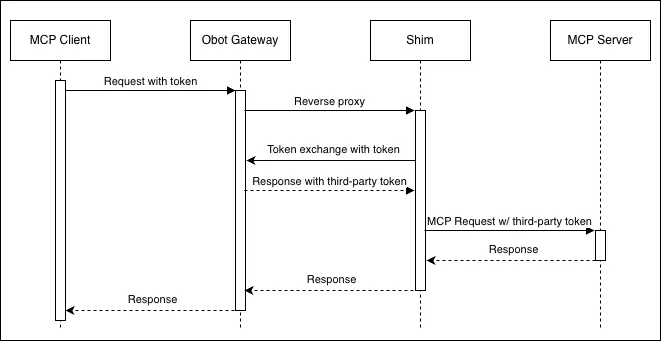
Typical Request Flow in Obot MCP Gateway
Let’s look at how a typical user request travels through Obot:
User authenticates via a supported identity provider (e.g., GitHub, Okta)
Client presents a token to the Gateway
Gateway validates token and checks access policy
Gateway ensures the MCP Server is running (Docker or Kubernetes)
Gateway routes request to the correct MCP server
Server responds with results
Gateway logs request for audit and monitoring
Results returned to client
This flow enables centralized security, policy enforcement, and auditing while preserving the MCP protocol’s flexibility.
Summary & Looking Ahead
Obot is a native purpose-built MCP Gateway platform. Obot platform provides MCP hosting, an MCP registry, an MCP gateway, and an MCP-standards-compliant chat client.
Stay tuned for Part 2, we will move from theory to practice. We’ll provide a detailed guide on how to onboard MCP servers using the Admin UI and explore the GitOps workflow for managing your MCP catalog at scale.