One of the things we shipped in v0.22.0 was centrally managed skills — the ability for an admin to curate a catalog of skills in Obot, govern who can access them, and let users install them into their local AI clients with a single CLI command. The announcement post covers the full feature set, but I wanted to write something more practical: an end-to-end walkthrough of what it actually looks like to build a skill, publish it, and wire it into Obot so your teammates can find and install it.
This is the post I would have wanted when I first started thinking about skills as a team artifact rather than a personal config file.
What a skill actually is
Before the mechanics, it’s worth being clear on what we mean by “skill,” because the word gets used loosely.
A skill in the agentskills.io sense is a directory with a SKILL.md file in it. That file has two parts: YAML frontmatter with a name and description, and a Markdown body with the actual instructions. The agent loads the name and description at startup across all skills (roughly 100 tokens per skill), and only pulls in the full instructions when a task matches. That’s the progressive disclosure model — it keeps context overhead low even when you have a lot of skills available.
The directory can also contain a scripts/ folder for executable code, references/ for documentation the skill can pull in on demand, and assets/ for templates and other static resources. But none of that is required. The minimal skill is just a SKILL.md.
The format is an open standard that’s been adopted across a lot of AI clients and coding agents — Cursor, Claude Code, Codex, VS Code, Kiro, Goose, and many others. When you publish a skill, it works across the whole ecosystem, not just Obot.
Ready to manage AI skills across your organization? Start a free Obot trial and see centralized skill management in action.
Writing a real skill
Let me work through a concrete example. Say your team has a standard process for writing internal incident reports: specific sections, a format engineering leadership expects, links to your runbook, the works. Right now that lives in a Confluence page that nobody reads until 2am when something is actually on fire. A skill is a better home for it.
Start by creating the directory:
incident-report/
└── SKILL.md
The frontmatter is required. The name must match the directory name exactly, can only use lowercase letters, numbers, and hyphens, and can’t start or end with a hyphen.
---
name: incident-report
description: >
  Writes an internal incident report following our standard format.
  Use when documenting a production incident, outage, or service degradation.
  Covers timeline reconstruction, impact assessment, root cause, and action items.
license: Proprietary
metadata:
  author: your-org
  version: "1.0"
---

## Incident Report

When asked to write an incident report, follow this structure:

### Required sections

**Incident Summary** — One paragraph. What happened, when it started, when it was resolved, and who was affected. Write this for a non-technical reader.

**Timeline** — Chronological list of events from first signal to resolution. Include timestamps. If the user hasn't provided them, ask.

**Impact** — Quantify where possible: number of users affected, duration, error rate, revenue impact if known. Be specific.

**Root Cause** — Technical explanation of what went wrong. Distinguish between the proximate cause (what broke) and the contributing factors (why it was able to break).

**Action Items** — Concrete follow-up tasks with owners and due dates. Each item should be specific enough to be tracked.

### Tone and style

Write in plain, direct language. Incident reports are read under stress — avoid jargon and long paragraphs. Use bullet points and headers liberally.

Don't assign blame to individuals. Write about systems and processes, not people.

### Before you write

Ask the user for anything that's missing: incident start and end times, services involved, who was on-call, and whether there's a linked ticket or postmortem doc.

See [references/runbook-links.md](references/runbook-links.md) for links to our internal runbooks.
The body is just Markdown. Write what helps the agent do the task well. If you have a reference doc your runbooks live in, put it in references/ and link to it from SKILL.md — the agent will load it when relevant.
A few things that make skills work better in practice:
Be specific about the trigger. The description is what the agent uses to decide whether to activate the skill. Include keywords that would appear in a real user request: “incident report,” “outage documentation,” “postmortem.” Vague descriptions like “helps with incidents” don’t trigger reliably.
Keep the body under 500 lines. Longer content loads fine, but split detailed reference material into references/ files so the agent can load them on demand rather than all at once.
Tell the agent what to do when information is missing. If your process requires specific inputs (timestamps, ticket numbers, impacted services), say so explicitly and tell the agent to ask.
Publishing to GitHub
Obot pulls skills from GitHub repositories. The structure is straightforward: one repository, one or more skill directories at the top level (or nested, Obot scans recursively for SKILL.md files).
Push that to GitHub. The repository can be public or private — Obot supports both, and for most teams a private repo with access scoped to the org is the right call. As organizations begin sharing skills more broadly, it’s also worth considering the security implications of skill distribution and third-party registries.
If you want to validate your SKILL.md before pushing, the agentskills reference library has a CLI validator:
npx skills-ref validate ./incident-report
It checks that your frontmatter is valid, the name matches the directory, and nothing violates the spec. Worth running before you open a PR.
Wiring it into Obot as a Skill Source
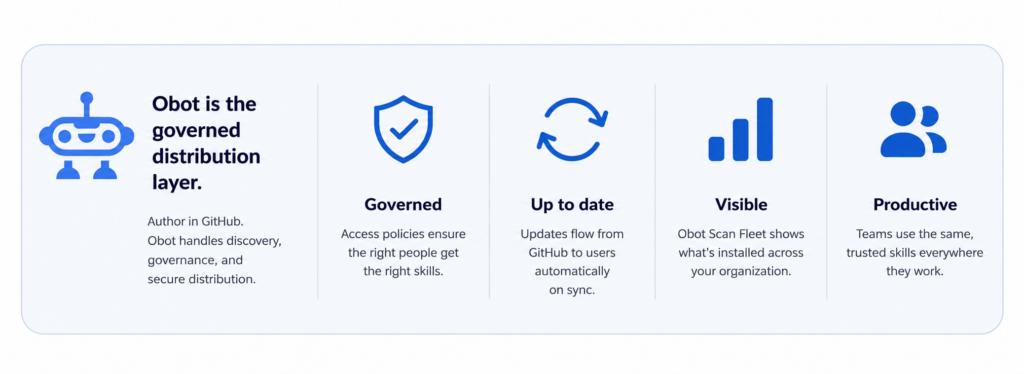
Once your repository is ready, an Obot admin adds it as a Skill Source. In the Obot admin UI, go to Skills → Skill Sources and add your repository URL. Obot indexes every SKILL.md it finds and re-syncs on a schedule, so updates you push to the repo show up in the catalog automatically.
Then you create Skill Access Policies to control who can install what. Policies are additive — you can grant access to a specific skill, an entire source repository, or every skill in the catalog. You can scope access to individual users or groups from your IdP. The workflow here mirrors the Model Access Policies and MCP server access policies that already exist in Obot, so if you’ve set those up before, this will feel familiar.
How a teammate installs the skill
Once the policy is in place, teammates install skills via the Obot CLI. The first time, they run obot setup, which walks through OAuth login against your Obot instance, detects the AI clients they have installed (Cursor, VS Code, Claude Code, Codex, and others), and installs a small bootstrap skill set that makes the rest of this work from inside the agent.
After that, they can search and install without leaving their coding agent:
No API keys to distribute. Auth is OAuth per Obot instance, tokens are stored in the OS keychain. There’s also a Skills page in the Obot user UI that lists the exact set of skills they’re allowed to install based on the policies the admin configured.
Why this matters beyond the convenience
The operational story here is worth naming explicitly. Before centrally managed skills, the way teams shared skills was Slack messages, dotfile repos, and hope. Someone writes a good skill, shares it in a channel, half the team installs it, nobody installs the update six weeks later, and eventually there are four divergent versions of the same skill across twelve people’s machines.
That’s the same problem that happens with MCP servers in the absence of governance — and the solution is the same one. As AI usage spreads across teams, this kind of MCP governance becomes essential for keeping tools, access, and updates under control. A catalog with a known owner, versioned in Git, with access policies that reflect actual team structure, and a way to push updates without chasing people down. The obot scan fleet visibility that shipped alongside this tells you what’s actually installed across your users’ machines, which closes the loop: you can see whether the update landed.
Skills are also where a lot of the actual productivity leverage from AI tools lives. MCP servers give agents access to systems. Skills give agents the procedural knowledge to use that access well. The incident report skill above doesn’t just tell the agent to write something — it encodes the specific format your org cares about, the sections that matter, the links to your runbooks. That context doesn’t exist anywhere else in a form an agent can use.
What to do next
If you’re already running Obot v0.22.0, you can add a Skill Source and try this today. The Obot skills documentation has the full setup steps. If you’re not on v0.22.0 yet, the installation guide has upgrade notes worth reading before you bump the version.
If you end up building skills you think would be useful beyond your own team, the agentskills.io community is where that conversation happens. The format is open, and the ecosystem is growing fast.