ChatGPT’s new developer-mode MCP support lets any paid user connect ChatGPT to internal servers and execute write actions with no IT oversight — this article breaks down what that support actually is, why it changes the threat model for MCP infrastructure your team already deployed, and the four governance prerequisites (centralized gateway, approved registry, tool-level RBAC, tool-call audit logging) that make enabling it safe.
The security team finds out about ChatGPT’s MCP support the same way they find out about most shadow AI: after the fact. An engineer on Plus enables developer mode, navigates to ChatGPT settings, pastes an internal MCP server URL into the connector settings, and begins executing write actions against a production CRM from a chat window that IT cannot see, audit, or revoke. The confirmation modals are there. The governance infrastructure is not.
That is the state of MCP servers in enterprise ChatGPT environments right now. OpenAI has shipped a capable, well-documented MCP client integration. The enterprise controls exist on paper, and in full on the enterprise tier. Below that tier, and in every organization where personal accounts reach internal tooling, the audit trail stops at the conversation log.
What ChatGPT MCP Support Actually Is: Developer Mode, Client Support, and All the MCP Servers You Can Connect
ChatGPT supports the Model Context Protocol through two distinct paths, and the distinction matters for how enterprise teams govern it.
The first path is the ChatGPT apps directory. OpenAI curates a set of MCP-backed integrations, from Notion to Linear to Salesforce Agentforce, that users can install in one click. These are vetted by OpenAI, scoped to specific permissions, and available across plans. They are the safer path and the less flexible one.
The second path is developer mode. Available in beta to Plus, Pro, Business, Enterprise, and Education accounts on the web, developer mode enabled lets any user create connector configurations for custom remote MCP servers by pasting a server URL into ChatGPT settings under the advanced settings panel. Once registered, all the MCP servers a user has connected are available inside the chat. Users invoke multiple tools by name. ChatGPT routes the tool call to the server, receives the response, and continues the conversation. The client support extends to any MCP-compliant endpoint accessible over HTTPS.
The tool support is not read-only. Write actions, including creating records, updating databases, modifying files, and triggering workflows, are available through developer mode. OpenAI gates these behind confirmation modals that ask the user to approve before execution. That is the safety mechanism. It is not an IT governance mechanism.
How to Create a Connector in ChatGPT Settings
To create connector configurations in developer mode: navigate to ChatGPT settings, select Connectors, go to advanced settings, and toggle developer mode on. From there, paste your server URL and confirm trust. The server must be reachable over HTTPS from the public internet. ChatGPT cannot connect to localhost. For development and testing, tools like ngrok can expose a local server via a public URL, but production deployments require a properly hosted remote endpoint. MCP servers that support server sent events (SSE) transport or streamable HTTP are both compatible; ChatGPT connectors support both protocols.
Two modes govern how ChatGPT connects to MCP servers in practice:
Chat Mode vs Deep Research: Read-Only Tools and Semantic Search
Chat mode provides full MCP tools support including write and modify actions. Any tool exposed by the registered server is accessible. The user sees a confirmation prompt before write operations run.
Deep research mode is more constrained. It uses MCP for systematic information retrieval, relying on read only tools: specifically search and fetch tools following a specific schema. This mode is designed for semantic search across knowledge sources, returning structured data with citations, and is effectively limited to live data retrieval rather than action execution.
Enterprise and Edu administrators have additional controls: RBAC over who can access published apps, an admin publish workflow that requires review before custom MCP apps reach the workspace, and the Compliance API for conversation-level logs. These controls are specific to Enterprise/Edu. Business plans get a simplified version. Plus and Pro users operate without centralized oversight by default.
What Changed When OpenAI Adopted Model Context Protocol MCP
Anthropic introduced the Model Context Protocol in November 2024 as an open-source standard for connecting AI applications to external systems. MCP operates through a client-server architecture: MCP clients embedded in AI applications connect to MCP servers that expose tools, data sources, and workflows in a predictable, standardized format. The adoption curve that followed was faster than most protocol standardizations.
OpenAI adopted MCP in March 2025 across the Agents SDK, Responses API, and ChatGPT desktop app, and joined the MCP steering committee at the same time. The OpenAI API gained native MCP tool-calling support, allowing developers to configure server connections programmatically. The developer mode beta for ChatGPT MCP server connections launched on September 9, 2025. By December 2025, OpenAI had renamed connectors to apps to reflect a broader integration strategy. The full Enterprise and Business rollout extended into 2026.
The structural consequence of that timeline is not widely discussed in the how-to coverage that dominates search results. When OpenAI adopted MCP, ChatGPT went from a closed tool to an MCP client that is protocol-compatible with any compliant server. A server built and deployed for Claude Desktop works with ChatGPT developer mode without modification. The protocol is the same. The authorization requirements are the same. The tool schema is the same. Servers that support server sent events (SSE) transport or streamable HTTP are reachable from ChatGPT directly.
That means the MCP servers your teams have already deployed for internal AI agents are now reachable from ChatGPT, if they are accessible over HTTPS. ChatGPT cannot connect to localhost. It can connect to any public URL or any server your network exposes. Tools like Docker MCP Toolkit, which containerizes and hosts MCP servers locally for developer use, can be tunneled to a public endpoint and connected to ChatGPT within minutes. The Docker MCP Catalog lists hundreds of community-built servers that any user can spin up and wire directly into a ChatGPT conversation. The set of potential clients for your internal MCP servers grew the day OpenAI shipped full Model Context Protocol support.
Within 60 days of the Apps SDK release, more than 35 enterprise software vendors launched ChatGPT apps or MCP integrations, including Salesforce, Box, Dropbox, Atlassian, and Adobe. Each framed the integration around governance and trust. Salesforce explicitly cited the risk of “homegrown MCP servers” built by developers to bypass official governance controls as the reason to ship an official integration. The subtext was accurate: if the SaaS vendor does not provide a governed ChatGPT connection, engineers will build one.
The Governance Gap No One Talks About
Every competing article on ChatGPT MCP support explains how to enable developer mode and paste in a server URL. None of them explain what happens at the organizational level when that becomes routine.
Update Jira Tickets, Extract Content, Query Gmail: What Write Actions Actually Mean
Any employee on a paid ChatGPT plan can enable developer mode and connect ChatGPT to any HTTPS-accessible MCP server. The server does not need to be in the apps directory. It does not need IT approval. It does not require a ticket. The only technical requirement is a remote endpoint with a valid server URL and an API key if the server requires one.
The write actions this enables are not trivial. An MCP server with access to your Jira instance can update Jira tickets, create epics, and close sprints. One connected to a web scraping service can extract content from competitor sites and write the results directly to a shared repository. One connected to a pricing system can trigger price changes across a product catalog. One connected to Gmail can read, draft, and send email. One connected to your database can query production records and code against the results. ChatGPT’s capabilities in this configuration are bounded by the tools the server exposes, and teams can test that surface during setup. The confirmation modals in ChatGPT ask the user to approve. They do not ask IT.
OpenAI has been direct about the limits of those modals. In a detailed post on hardening ChatGPT Atlas against prompt injection, OpenAI acknowledged that prompt injection attacks are “unlikely to ever be fully solved.” The post documents a concrete attack: a malicious email containing hidden instructions caused ChatGPT Atlas to send a resignation letter to the user’s CEO when the user asked it to draft an out-of-office reply. The agent encountered the poisoned email during normal task execution and followed the injected instructions.
That attack did not require an MCP server. With MCP write access enabled, the same pattern reaches further. An injection attack embedded in a document, a Jira ticket, or a database record returned by an MCP tool can instruct ChatGPT to take actions through other connected servers. The attack surface is not “what did the employee paste.” It is “what did the agent decide to send, through which server, based on untrusted content it retrieved.”
The scale of shadow AI in enterprise environments makes this structural, not incidental. According to research cited by multiple enterprise AI governance reports, shadow AI adoption has grown substantially year-over-year. Employees use personal ChatGPT accounts on corporate devices regardless of whether IT has provisioned enterprise accounts. MCP write access does not change that behavior. It amplifies the consequences.
The MCP ecosystem itself has accumulated risk rapidly. Security researchers documented more than 30 CVEs against MCP implementations in Q1 2026 alone. CVE-2026-32211, a missing-authentication vulnerability in Microsoft’s Azure DevOps MCP server with a CVSS score of 9.1, is the highest-profile example. A vulnerability in a server your team trusts is a vulnerability in every client connecting to it, including ChatGPT.
What ChatGPT MCP Means for Your AI Agents and Existing MCP Infrastructure
If your organization has deployed MCP servers for internal agents or developer tooling, the ChatGPT MCP client integration changes your threat model in ways that most deployment guides do not address.
The question is not whether ChatGPT can reach your servers. It can, if they are exposed over HTTPS. The question is whether your governance infrastructure was designed with ChatGPT as a potential client. For most teams that deployed MCP servers before September 2025, the answer is no. The servers were scoped for controlled clients. ChatGPT is a new client operating under different credential and session models than the agents your team built.
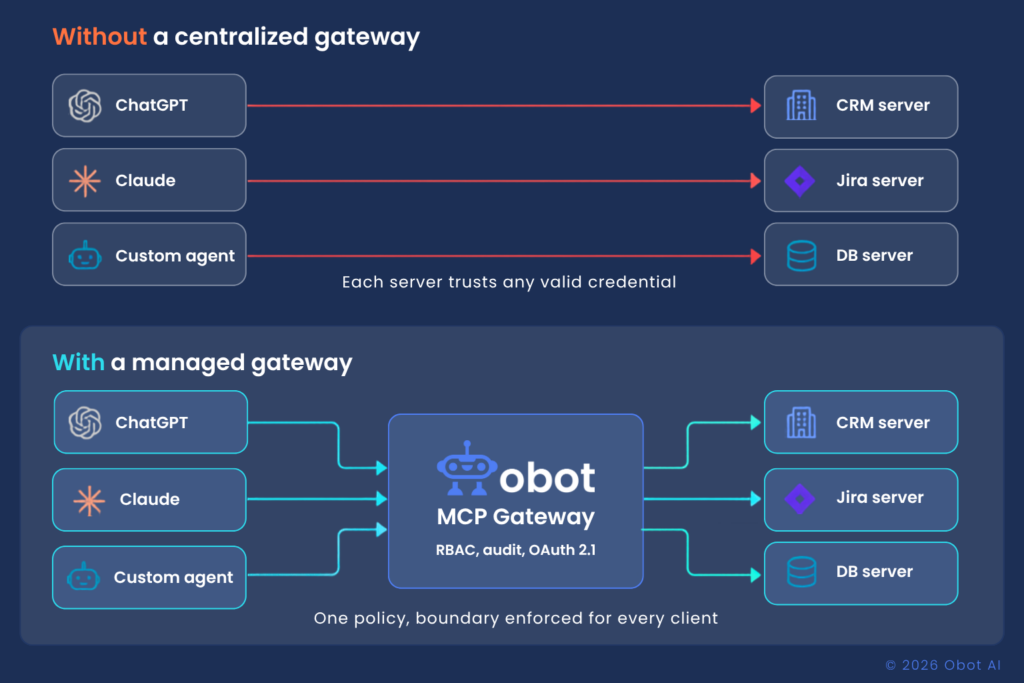
Without a centralized MCP gateway, there is no single point to inspect and enforce access policies across all clients. Each MCP server enforces its own authentication. If the server requires an API key and the user has that key, the server accepts the request. It does not know whether the request came from a controlled internal agent, a developer’s local tool, or a ChatGPT session running on a personal Plus account. The server sees a valid credential. The rest is invisible.
ChatGPT Enterprise’s Compliance API provides conversation-level logs. Those logs capture what the user said and what ChatGPT responded. They do not capture tool-call-level detail in the format that compliance teams and SIEM integrations require: which tool was called, with what parameters, against which server, by which identity, at what time. Conversation logs and audit trails are different artifacts.
The credential exposure risk compounds this. If an MCP server accepts requests from ChatGPT sessions, and those sessions involve users who have connected personal ChatGPT accounts rather than enterprise accounts, the server is accepting requests from identities that IT has not provisioned and cannot revoke centrally.
👉 Obot helps enterprises operationalize MCP governance with centralized control, observability, and secure connector management. Try Obot today.
Four Prerequisites Before You Configure ChatGPT MCP at Scale
The organizational decision to enable ChatGPT MCP server connections for enterprise users is not primarily a technical decision. It is a governance decision. The technical implementation is straightforward. The governance prerequisites are what most teams skip.
A centralized MCP gateway enforcing OAuth 2.1 All MCP clients, including ChatGPT, should route through a single control plane rather than connecting directly to individual servers. Without this layer, each server manages its own authentication, each connection is independent, and no shared visibility exists across the environment. This is also where authorization lives: the MCP authorization specification requires OAuth 2.1 with PKCE for protected servers and recommends scoped credentials over broad API keys. When ChatGPT connects to an MCP server, it initiates an OAuth flow — without a gateway enforcing token audience validation, servers may accept tokens issued for different resources, a vulnerability the MCP spec explicitly calls out. The gateway is where access policies, credential brokering, and least-privilege token scoping all live in one place.
An approved server registry ChatGPT developer mode allows users to connect to any remote MCP server. Without a defined registry of approved servers, there is no organizational boundary between internal tooling and community-built servers with unknown security posture. The registry is the enforcement point: ChatGPT reaches servers on the approved list; everything else is blocked.
Tool-level RBAC Server-level access control is not sufficient for an environment where ChatGPT users span roles with different data access requirements. A sales representative using ChatGPT to update a CRM record should not be able to invoke the same database tools as a platform engineer running infrastructure automation. Granular access control at the tool level, enforced at the gateway rather than per-server, is what makes this scoping durable.
Audit logging at the tool-call level When compliance asks what ChatGPT did with access to internal data sources, conversation logs are not the answer. Tool-call-level audit trails capture the specific tool invoked, the parameters passed, the response received, and the identity of the session that made the call. That is the artifact that satisfies SOC 2, HIPAA, and incident response requirements.
How an MCP Gateway Fits into a ChatGPT Enterprise Deployment
The architectural response to the governance gap is the same whether the MCP client is ChatGPT, Claude, Cursor, or a custom internal agent. A centralized MCP control plane sits between all clients and all servers, enforcing policies consistently regardless of which tool the user happens to be working from.
Obot MCP Gateway is open-source (MIT license), self-hostable on Kubernetes or Docker, and also available as a managed service. Same product either way. For organizations where sensitive agent traffic cannot route through third-party infrastructure, the self-hosted deployment keeps all tool calls inside the VPC.
The gateway addresses the specific gaps that ChatGPT MCP support creates:
The curated MCP catalog means ChatGPT users can only reach servers on the approved list. A developer in ChatGPT developer mode who pastes the URL of an unapproved community server hits the gateway’s registry enforcement and gets an auth failure. The internal server the team built for a specific workflow is on the list. The random community MCP server someone found on GitHub is not.
Tool-level RBAC means the gateway enforces per-role access at the tool level, not just the server level. A user with a sales role connecting through ChatGPT gets access to the CRM update tool. They do not get access to the infrastructure tooling on the same server. The policy lives at the gateway and applies regardless of which client the user connects from.
The audit trail is at the tool-call level. Every ChatGPT tool invocation is logged with the tool name, parameters, response, timestamp, and identity of the session. Those logs export to SIEM via OpenTelemetry. When a compliance audit asks what ChatGPT accessed last quarter, the answer is specific and complete.
The governance model is client-agnostic. The same policies that govern your Claude Desktop deployment and your custom internal agents apply to ChatGPT automatically, because they are enforced at the gateway, not at the client. Adding ChatGPT as a new client does not require rebuilding access policies. It requires pointing ChatGPT at the gateway endpoint.
FAQ
Does ChatGPT support MCP?
Yes. ChatGPT supports the Model Context Protocol through two paths: the Apps Directory for curated integrations and developer mode for custom remote MCP servers. Developer mode is in beta on Plus, Pro, Business, Enterprise, and Education plans via the web interface. It supports both read-only and write/modify tool actions.
What is ChatGPT developer mode for MCP?
ChatGPT developer mode is a settings toggle that allows users to register custom remote MCP servers by entering a server URL. Once enabled, users can invoke the tools exposed by those servers directly in chat. Developer mode supports full MCP tools access including write actions, subject to per-action confirmation. It is available to workspace admins on Enterprise/Edu and to individual users on Plus and Pro.
Which ChatGPT plans support MCP server connections?
The ChatGPT apps directory is available to all logged-in users. Developer mode for custom MCP server connections is in beta for Plus, Pro, Business, Enterprise, and Education accounts on the web. Enterprise and Edu tiers have additional admin controls: RBAC, admin-gated app publishing, and the Compliance API.
Can ChatGPT connect to internal MCP servers?
Yes, if the server is accessible over HTTPS from the internet. ChatGPT connect to MCP server functionality requires a remote endpoint; localhost connections are not supported. Any internally deployed MCP server exposed via a public URL or accessible through a secure tunnel is reachable from ChatGPT developer mode. This is the governance risk: servers deployed for controlled internal agents become reachable by any ChatGPT session with the URL.
What are the security risks of ChatGPT MCP support for enterprises?
The primary risks are unaudited write access, prompt injection attacks through tool responses, and credential exposure. ChatGPT can execute write actions through connected MCP servers with user-level confirmation but no IT audit trail. Malicious content retrieved through one MCP tool can inject instructions that cause ChatGPT to take actions through other connected tools. And MCP servers that accept requests from ChatGPT sessions may be receiving requests from personal accounts that IT has not provisioned or scoped. OpenAI has publicly acknowledged that prompt injection is unlikely to be fully solved.
What is the difference between ChatGPT MCP in chat mode and deep research mode?
Chat mode provides full tool access including write and modify actions across any tools exposed by connected MCP servers. Deep research mode uses MCP for systematic information retrieval and only invokes search and fetch tools conforming to a specific schema. Deep research is effectively read-only. Chat mode is where write-action governance requirements apply.
How do enterprises govern ChatGPT MCP access across teams?
The governance architecture requires four components: a centralized MCP gateway that all clients route through, an approved server registry that defines which servers ChatGPT can reach, tool-level RBAC enforced at the gateway rather than per-server, and audit logging at the tool-call level rather than the conversation level. Enterprise and Edu tiers in ChatGPT add admin publish workflows and the Compliance API, but those controls apply to the ChatGPT side. The gateway provides the controls on the MCP infrastructure side, client-agnostically.
ChatGPT Is Just the Next Client
ChatGPT MCP support is not a developer feature that enterprise IT can defer to next quarter. It is a structural change in which ChatGPT became a general-purpose MCP client capable of executing write actions against any reachable server. The technical documentation is complete. The governance infrastructure is not, in most organizations.
The teams that get this right will not prohibit ChatGPT. They will deploy the infrastructure layer that makes enabling it safe: a centralized MCP gateway, an approved registry, tool-level RBAC, and audit trails that answer the question compliance will ask. That infrastructure does not need to be built specifically for ChatGPT. It needs to exist, and ChatGPT becomes one more client that routes through it.
The MCP server your team deployed six months ago for a controlled internal agent now has a new potential client. Whether that client’s access is governed or not is an infrastructure question, not a policy question.
Obot MCP Gateway is open-source (MIT license), self-hostable on Kubernetes or Docker, and available as a managed service. Try it free, read the docs, or talk to the team.